The Ultimate Guide to Understanding SEO Canonicalization
 Reading Time: 12 minutes
 TL;DR Summary: Canonicalization in Plain English: Canonical tags tell search engines which version of a page is the primary one. They help prevent duplicate content issues and consolidate ranking signals. Implement them in the section using absolute HTTPS URLs. Google can choose a different canonical URL than what you specify. Use canonical tags for duplicate/similar content; use redirects when permanently moving pages. Self-referencing canonicals are a best practice for all pages.
Duplicate content can silently damage your SEO efforts. When search engines find multiple versions of the same content, they struggle to determine which version to index and rank. This confusion can split your link equity, dilute your ranking power, and ultimately hurt your visibility in search results.
Canonicalization solves this problem by clearly signaling to search engines which version of a page should be considered the authoritative one. This comprehensive guide will walk you through everything you need to know about implementing canonical tags correctly.
What Canonicalization is and Why it Matters
Canonicalization is the process of selecting one preferred URL when multiple URLs contain identical or very similar content. The canonical URL is the version you want search engines to treat as authoritative and display in search results [1].
The canonical tag (technically a link element with the rel=”canonical” attribute) is an HTML element placed in the <head> section of a webpage. It tells search engines which URL should be considered the primary version of the page [3].
What is a Canonical Tag Example?
The canonical tag is an HTML code used by search engines to determine which URL should be indexed in case more than one URL contains the same or almost identical information.

One of the tools that are used by search engines for determining which page will be indexed is the canonical tag.
Here is an example of a canonical tag:
<link rel="canonical" href="https://example.com/the-rest-of-the-url/" />Why Canonicalization Is Critical for SEO
Without proper canonicalization, your site can suffer from several SEO issues:
- Duplicate content problems: Search engines may struggle to decide which version of a page to index and rank [2].
- Diluted link equity: When links point to different versions of the same content, your ranking power gets split instead of consolidated [1].
- Wasted crawl budget: Search engines spend time crawling duplicate pages instead of discovering your unique content [2].
- Inconsistent signals: Analytics data, user signals, and ranking factors get divided across multiple URLs [1].
Common Scenarios That Create Duplicate Content
Duplicate content often occurs unintentionally through technical aspects of websites:
- URL parameters: Tracking codes, session IDs, and sorting parameters (example.com/page?id=123) [6]
- Protocol variations: HTTP vs. HTTPS versions of the same page [1]
- WWW vs. non-WWW: www.example.com vs. example.com [1]
- Trailing slashes: example.com/page vs. example.com/page/ [1]
- Case sensitivity: example.com/Page vs. example.com/page [1]
- Print-friendly versions: example.com/page vs. example.com/page?print=true [2]
- Mobile versions: example.com vs. m.example.com [2]
- Product variations: Same product with different colors/sizes generating unique URLs [2]
Identify Duplicate Content Issues on Your Site
Get our free canonicalization checklist to find and fix duplicate content problems before they hurt your rankings.
Signals Search Engines Use to Pick a Canonical
While you can suggest your preferred canonical URL, search engines like Google make the final decision. They consider multiple signals to determine which version of a page to index [2].
How Google Chooses a Canonical URL
- Explicit signals: Your canonical tags, 301 redirects, and sitemap entries [1]
- Internal linking: Which version of the URL you link to most consistently within your site [2]
- External linking: Which version receives the most backlinks from other websites [2]
- HTTPS vs. HTTP: Secure pages are preferred over non-secure ones [1]
- URL simplicity: Cleaner URLs without unnecessary parameters are favored [2]
- Content consistency: The most complete version of the content [2]
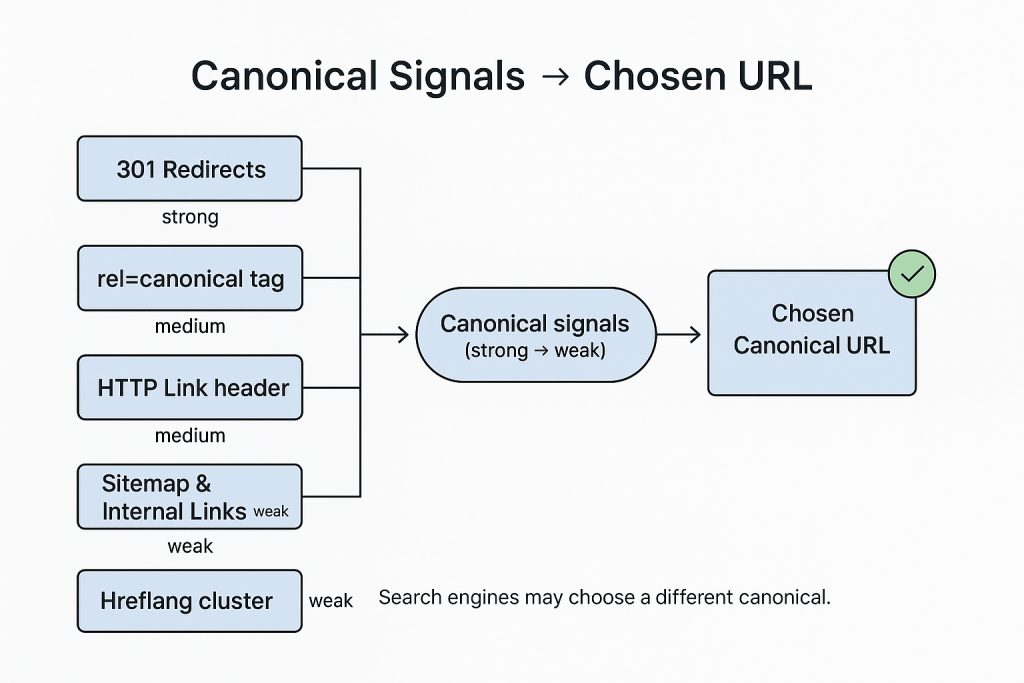
Signal Strength Hierarchy
Not all canonicalization signals carry equal weight. Here’s the general hierarchy from strongest to weakest [1][2]:
- 301 redirects: The strongest signal that a page has permanently moved
- Canonical tags: A strong hint about your preferred URL
- HTTPS security: Secure pages are preferred over non-secure ones
- Internal linking patterns: How you link to your own content
- URL in sitemap: URLs included in your XML sitemap
- External links: Which version other sites link to most
- URL simplicity: Cleaner, simpler URLs are often preferred
Remember that Google may choose a different canonical URL than what you specify if other signals strongly suggest an alternative version is more appropriate [2].
Canonical vs Redirect vs Noindex (When to Use Each)
Canonicalization is just one tool for managing duplicate content. Understanding when to use canonical tags versus redirects or noindex directives is crucial for effective SEO [1][9].
| Feature | Canonical Tag | 301 Redirect | Noindex Tag |
| When to use | Similar/duplicate content that needs to remain accessible | Content has permanently moved or should no longer be accessible at the old URL | Content should remain accessible to users but not appear in search results |
| Pros | Preserves user access to all URLs while consolidating SEO value | Strongest signal to search engines; passes most link equity | Completely removes page from search results while keeping it accessible |
| Cons | Only a suggestion; search engines may ignore it | Users can’t access the original URL; implementation errors can break user experience | Doesn’t consolidate link equity; wastes crawl budget |
| Typical outcomes | Consolidated ranking signals; only canonical version appears in search | Original URL disappears from index; new URL gains most link equity | Page removed from search results but still accessible via direct links |
Decision Tree: Choosing Between Canonical, Redirect, and Noindex
Follow this decision tree to determine which solution is best for your specific situation:
- Is the content permanently moving to a new URL?
- Yes → Use a 301 redirect
- No → Continue to question 2
- Do you need both URLs to remain accessible to users?
- Yes → Continue to question 3
- No → Use a 301 redirect to the preferred version
- Is the content identical or very similar across URLs?
- Yes → Use a canonical tag pointing to the preferred version
- No → Continue to question 4
- Should the content appear in search results?
- Yes → Keep as unique content with self-referencing canonical
- No → Use noindex tag
- Is this syndicated content appearing on multiple domains?
- Yes → Use a cross-domain canonical tag on syndicated versions pointing to the original [8]
- No → No special action needed beyond normal canonicalization
Correct Implementation Examples (Copy/Paste)
Implementing canonical tags correctly is crucial for their effectiveness. Here are the proper formats for different scenarios [1][3][4].
HTML Canonical Tag
Place this in the <head> section of your HTML document:
<link rel="canonical" href="https://example.com/preferred/" />HTTP Header Canonical (for PDFs and Non-HTML Files)
For non-HTML files like PDFs, use the HTTP header method [4]:
Link: <https://example.com/preferred/>; rel="canonical"Self-Referencing Canonical
Even for pages without duplicates, use a self-referencing canonical [1]:
<link rel="canonical" href="https://example.com/this-page/" />Cross-Domain Canonical
For content syndicated across multiple domains [8]:
<link rel="canonical" href="https://original-source.com/article/" />Implementation by CMS
- WordPress: With Yoast SEO: Edit page → Advanced tab → Canonical URL field
- Shopify: Automatically adds self-referencing canonicals. For custom: Edit theme.liquid file in section
- Wix: Dashboard → SEO Tools → Advanced SEO → Select page → Canonical URL
Need Help With Technical Implementation?
Download our step-by-step implementation guide with code examples for all major platforms.
Hreflang and Canonical — Playing Nice Together
When managing multilingual or multi-regional websites, you need to understand how hreflang annotations interact with canonical tags [8].
The Relationship Between Hreflang and Canonical
Hreflang tags tell search engines which language/region version of a page to show users, while canonical tags indicate the preferred version for indexing. These can work together, but if implemented incorrectly, they can send conflicting signals [8].

Correct Implementation
For proper implementation across language/region variants [8]:
- Use self-referencing canonicals: Each language version should have a canonical tag pointing to itself, not to a “primary” language version.
- Implement complete hreflang sets: Each language version should reference all other language versions, including itself.
- Maintain consistency: Ensure your canonical URLs match the URLs in your hreflang annotations.
Example: Correct Hreflang and Canonical Implementation
For a page about shoes available in English, Spanish, and German:
On the English page (example.com/shoes):
<link rel="canonical" href="https://example.com/shoes" />
    <link rel="alternate" hreflang="en" href="https://example.com/shoes" />
    <link rel="alternate" hreflang="es" href="https://example.com/es/zapatos" />
    <link rel="alternate" hreflang="de" href="https://example.com/de/schuhe" />
On the Spanish page (example.com/es/zapatos):
<link rel="canonical" href="https://example.com/es/zapatos" />
    <link rel="alternate" hreflang="en" href="https://example.com/shoes" />
    <link rel="alternate" hreflang="es" href="https://example.com/es/zapatos" />
    <link rel="alternate" hreflang="de" href="https://example.com/de/schuhe" />
On the German page (example.com/de/schuhe):
<link rel="canonical" href="https://example.com/de/schuhe" />
    <link rel="alternate" hreflang="en" href="https://example.com/shoes" />
    <link rel="alternate" hreflang="es" href="https://example.com/es/zapatos" />
    <link rel="alternate" hreflang="de" href="https://example.com/de/schuhe" />
Edge Cases, Pitfalls, and Gotchas
Even experienced SEOs can make mistakes with canonicalization. Here are some tricky scenarios and how to handle them [1][2][9].
Pagination and Canonicalization
Google no longer uses rel=”prev/next” for pagination [7], but proper canonicalization is still important:
- Don’t canonicalize paginated pages to page 1: This prevents Google from discovering content on deeper pages.
- Use self-referencing canonicals: Each page in a paginated series should have a canonical pointing to itself.
- Consider a view-all page: If you have a “view all” option, you might canonicalize paginated pages to it if it provides a good user experience.
Faceted Navigation and Filters
E-commerce sites with product filters create many URL variations [6]:
- Identify valuable filter combinations: Some combinations might deserve their own canonical URLs if they have search volume.
- Canonicalize most filter combinations: Point most filtered URLs to the main category page.
- Consider noindex for some filters: For filters with no search value that you still want users to access.
URL Parameters
With Google’s URL Parameters tool now deprecated [6], canonical tags are even more important:
- Tracking parameters: Always canonicalize URLs with UTM or other tracking parameters to the clean version.
- Session IDs: Canonicalize URLs with session identifiers to the version without them.
- Sort/filter parameters: Generally canonicalize to the default page unless specific combinations have search value.
JavaScript-Injected Canonicals
Canonical tags added via JavaScript may not be recognized consistently [1]:
- Server-side is better: Whenever possible, include canonical tags in the server response.
- Rendered HTML matters: If using JavaScript, verify that Google sees your canonical in the rendered HTML.
AMP and Canonicalization
For Accelerated Mobile Pages [1]:
- AMP as alternate: Standard HTML pages should have self-referencing canonicals, while AMP pages should have canonicals pointing to the standard HTML version.
- AMP as canonical: If AMP is your only version, use a self-referencing canonical on the AMP page.
Troubleshooting (GSC messages, conflicts, loops)
When canonicalization goes wrong, Google Search Console often provides clues about what’s happening [1][2].
Common Google Search Console Messages
- “Duplicate, Google chose different canonical than user”: Google is ignoring your canonical tag in favor of another URL it thinks is more appropriate.
- “Duplicate, submitted URL not selected as canonical”: Similar to above, but specifically for URLs in your sitemap.
- “Crawled – currently not indexed”: Sometimes indicates canonicalization issues where Google is choosing not to index a page.
Diagnosing Canonicalization Problems
- Check for conflicting signals: Ensure your canonical tags, internal links, sitemaps, and redirects all point to the same preferred URLs.
- Inspect the URL in GSC: Use the URL Inspection tool to see which URL Google considers canonical and why.
- Look for canonical loops: Ensure you don’t have Page A canonicalizing to Page B, which canonicalizes back to Page A.
- Check for redirect chains: Canonical URLs should not redirect to other URLs.
- Verify implementation: Ensure canonical tags are in the <head> section and use absolute URLs.
Fixing Common Issues
- Multiple canonical tags: Remove all but one canonical tag per page.
- Canonical to non-200 page: Update canonical to point to a page that returns a 200 status code.
- Relative URLs in canonicals: Replace with absolute URLs including the protocol (https://).
- Inconsistent internal linking: Update internal links to consistently point to canonical URLs.
- Sitemap includes non-canonical URLs: Update your sitemap to include only canonical URLs.
Need Help Troubleshooting Canonical Issues?
Get our advanced troubleshooting guide with step-by-step solutions for common canonicalization problems.
Quick Checklists (new builds, faceted nav, syndication)
Use these checklists to ensure proper canonicalization in different scenarios [1][2][9].
New Website Build Checklist
- Implement self-referencing canonicals on all pages
- Choose between www or non-www and set up proper redirects
- Ensure HTTPS is used for all canonical URLs
- Configure server to handle trailing slashes consistently
- Set up proper handling of URL parameters
- Include only canonical URLs in your XML sitemap
- Implement consistent internal linking to canonical URLs
E-commerce Faceted Navigation Checklist
- Identify valuable filter combinations worth indexing
- Canonicalize most filter/sort combinations to main category pages
- Consider noindex for low-value but necessary filter pages
- Ensure product variants (size, color) canonicalize to the main product
- Handle pagination with self-referencing canonicals
- Implement proper handling of search result pages
Content Syndication Checklist
- Original publisher uses self-referencing canonical
- Syndicated copies use cross-domain canonical to original
- Consider using noindex on syndicated content instead of canonicals [8]
- Ensure canonical URLs are accessible and return 200 status
- Monitor for proper implementation across syndication partners
Technical Audit Checklist
- Verify canonical tags are in the <head> section
- Ensure all canonical URLs use absolute paths with https://
- Check that canonical URLs return 200 status codes
- Look for pages with multiple canonical tags
- Identify canonical loops or chains
- Verify consistency between canonicals and hreflang tags
- Check that non-HTML resources use HTTP header canonicals
FAQs
Do canonical tags pass link equity?
Yes, canonical tags help consolidate link equity (ranking power) from duplicate pages to the canonical version. While not as strong as a 301 redirect, they effectively tell search engines which page should receive the ranking signals [1].
Can I use canonical tags across different domains?
Yes, cross-domain canonical tags are supported and commonly used for content syndication. They tell search engines that content appearing on multiple domains has an original source that should receive the ranking credit [8].
Will Google always respect my canonical tags?
No, canonical tags are treated as strong hints, not directives. Google may choose a different canonical URL if other signals (like redirects, internal linking, or content similarity) strongly suggest another page should be the canonical version [2].
Should I use canonical tags or 301 redirects?
Use 301 redirects when content has permanently moved and users should no longer access the old URL. Use canonical tags when you need to keep multiple URLs accessible to users (like product variants or pages with tracking parameters) but want search engines to treat one version as the primary one [1][9].
Do I need canonical tags if I use hreflang?
Yes, but they must be implemented correctly. Each language/region version should have a self-referencing canonical tag, not a canonical pointing to a “primary” language version. This ensures your hreflang implementation works properly without sending conflicting signals [8].
Can I use relative URLs in canonical tags?
While technically allowed by HTML standards, Google recommends using absolute URLs (including the protocol and domain) in canonical tags to avoid any potential misinterpretation [1].
Should I include parameters in canonical URLs?
Generally, no. Canonical URLs should typically be the cleanest version without unnecessary parameters. However, if a parameter fundamentally changes the content (like a language parameter), it might be appropriate to include it [6].
Glossary
- Canonical Tag: An HTML element that specifies the preferred version of a webpage when multiple URLs contain similar content.
- Canonical URL: The preferred URL that should be indexed and ranked by search engines.
- Self-referencing Canonical: A canonical tag that points to the URL of the page it’s on.
- Cross-domain Canonical: A canonical tag that points to a URL on a different domain.
- Duplicate Content: Substantially similar content that appears on multiple URLs.
- Link Equity: The ranking value passed from one page to another through links.
- Crawl Budget: The resources search engines allocate to crawling a website.
- Hreflang: An HTML attribute that specifies the language and geographical targeting of a webpage.
- 301 Redirect: A permanent redirect from one URL to another.
- Noindex: A directive that tells search engines not to include a page in search results.
References
- [1] Google Search Central — How to specify a canonical URL
- [2] Google Search Central — What is canonicalization
- [3] IETF RFC 6596 — The Canonical Link Relation
- [4] IETF RFC 8288 — Web Linking (Link header)
- [5] WHATWG HTML — Link type “canonical”
- [6] Google — URL Parameters tool deprecated (2022)
- [7] Google — No longer uses rel=prev/next for pagination
- [8] Google — Hreflang documentation
- [9] Bing Webmaster Guidelines — canonical guidance
Master Technical SEO
Download our complete Technical SEO Checklist with 75+ actionable items to improve your site’s performance.
📄 Download a PDF of This Article