NoIndex Checker – Can My Site Be Indexed?

TL;DR Summary: If your website isn't showing up on Google, it might be due to technical issues like a rogue noindex tag or misconfigured robots.txt file. Use this No Index Checker Tool to quickly identify and fix these problems, ensuring search engines can index your site properly. Don't miss out on potential traffic and rankings - run this simple check today!
If your website isn’t showing up in Google search, the problem might not be your content — it could be that your site is literally telling search engines to stay away. It happens more often than you’d think. Whether it’s a rogue noindex tag, a misconfigured robots.txt file, or an overlooked server setting, these simple mistakes can keep your site from being indexed at all.
Use the NoIndex Checker Tool:
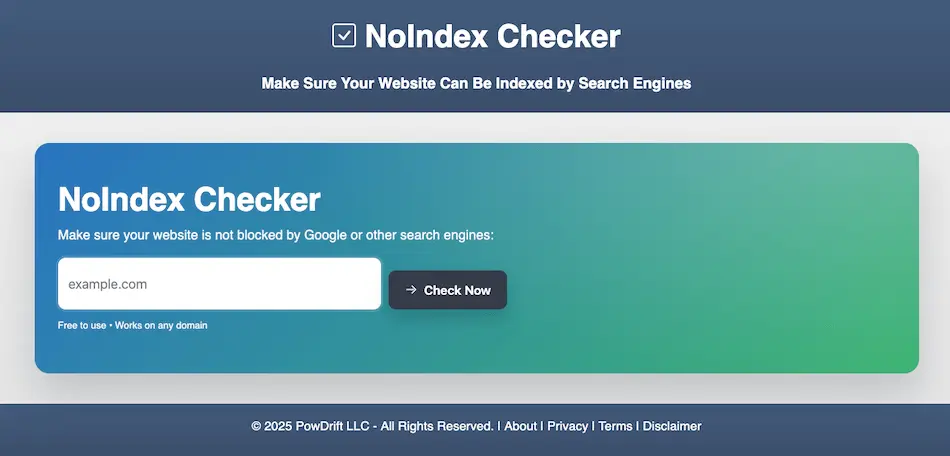
I built a free tool to answer to find out of your website can be indexed. It checks the most common technical issues that block indexing and gives you a clear answer — no jargon, no guessing.
What Does the No Index Checker Look For?
- Meta Robots Tag: Is there a
noindextag blocking crawlers? - X-Robots-Tag HTTP Header: Sometimes the server sends this behind the scenes.
- robots.txt File: A common place to block search engines (sometimes by mistake).
- Google Analytics: Not related to indexing, but it’s worth checking if you’re tracking traffic.
What to Do if a Problem is Reported…
Here’s how to fix each issue the Index Checker might flag. If any of this feels overwhelming, reach out — I can help.
❌ noindex Meta Tag Found
This tag tells Google not to index the page. It’s often left in place after launching a site. You’ll find it in your site’s <head> section. Look for something like:
<meta name="robots" content="noindex">Remove that tag, or change it to index, follow if you want search engines to crawl and index the page.

❌ X-Robots-Tag: noindex Header Found
This is like a secret handshake between your server and search engines — and it can block your entire site. It’s often set by a plugin or in your server’s config file (like .htaccess or NGINX rules).
You’ll need developer or host access to fix this. Remove or comment out any rule that sets X-Robots-Tag: noindex.
⚠️ robots.txt Might Be Blocking Crawlers
If you see a line like Disallow: / under User-agent: * in your robots.txt file, that’s telling all crawlers to stay out.
Edit robots.txt (usually at /robots.txt) and make sure it allows crawling. A simple default that works for most sites looks like this:
User-agent: *
Disallow:
Don’t delete your robots.txt file entirely — just fix what’s inside.
⚠️ Google Analytics Not Detected
This isn’t a blocker, but it’s a missed opportunity. If you’re not using Google Analytics (or something similar), you won’t know how people are finding — or not finding — your site.
To install it, go to Google Analytics, create a property, and follow their setup instructions. You’ll copy a small script and add it to your site’s header (or use a plugin like GA4WP or Site Kit).
Why Your Site Might Not Be Indexable
It usually comes down to a developer forgetting to switch a setting after launch, a plugin being too aggressive, or someone trying to fix something and unintentionally making it worse. These small changes can lead to major visibility issues.
Even experienced site owners miss this stuff. That’s why this check is worth running — especially if you’ve recently launched a new site, redesigned it, or switched platforms.
How to Check if a Page is set to “noindex”
Normally, you’d have to look at the source code of your page or inspect HTTP headers to see if there’s a noindex tag. Or you’d need to fetch the robots.txt file and interpret what it says. This tool automates all that in one click.
Does My Site Have Analytics?
The tool also checks whether you’re using Google Analytics. This isn’t directly related to indexing, but it’s important. If you’re not tracking your visitors, you don’t know what’s working — or what’s broken.
Is My Site Indexable? Let’s Find Out.
If your site passes all the checks, that’s great — it means Google should be able to crawl and index your content. If not, we’ll show you exactly what’s wrong, in plain English. And if you need help fixing anything, just reach out.
Final Thoughts on a Site Being Indexable
Your site might look great and load fast, but if search engines can’t access it, none of that matters. Start by making sure your site is actually open for indexing. This simple test can help you avoid months of missed traffic and lost rankings.
Need Help Fixing Your Site?
If you can’t seem to get this fixed, don’t know how, or don’t want to, I can help. My website company, Webstix, has a Maintenance Department who is just waiting for small requests like this. I say small because they’re not projects for entire website redesigns or new sites. We formed this very good team to just help our clients and anyone with their website. They do excellent work. There’s a special for new clients where you get 1 hour (2 Maintenance Blocks) or 2 hours (4 Maintenance Blocks) for s special price. Go check out Webstix Maintenance.
📄 Download a PDF of This Article