
Word Flashcard Template – Free Download

TL;DR Summary: Make your own flashcards in Word easily with these free downloadable templates for 3x5 and 4x6 sizes. No need to fiddle with settings - just type, print, and study efficiently. Get the templates on the page for instant use. Visit the website for more helpful tools and resources.
Free Flash Card Template for Word (3×5 and 4×6)
Need to make flashcards in Microsoft Word? You’re not alone. A lot of people search for a 3″ x5″ or 4″ x 6″ flashcard template and come up empty. So, I made one—and it’s free to download.
Whether you’re studying for a test, creating language flashcards, or teaching your kids, these printable Word templates let you quickly type, format, and print your own flashcards—front and back.
Download the Templates Here
No email required – instant download
Both are set up in landscape orientation with one card per page for easy double-sided printing. Just open the file, type your question or term on one page, and the answer or definition on the next. A new page, in this template, equals a new cart – either front or back (alternating).
For example:

- Card 1 = front
- Card 2 = back
- Card 3 = front
- Card 4 = back
- (and so on)
Print double-sided and cut if needed.
Tips for Printing
- Choose “Flip on long edge” for double-sided printing
- Use heavier cardstock for durability
- Cut the cards if needed—or use pre-cut blank index card sheets if your printer supports them
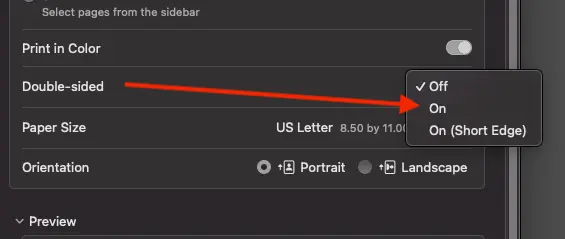
⚠️ What works for me is printing to PDF and then choosing Double-sided and set it to “On”
And, I’m not getting a commission on this or anything, but to print these on actual 3×5 cards, you’ll want something like these printable Avery index/flash cards:
Or you could use regular paper (maybe a thicker stock) and cut them yourself.
Why I Made This
I searched for these templates and couldn’t find a good one, just a bunch of confusing instructions or paid downloads. Even the Avery ones were hard to use (and they wanted my email address). So I made clean, easy-to-use templates and put them here for anyone who needs them.
Want More Free Tools Like This?
Stick around. This site has a bunch of practical tools and resources like this. No fluff. Just helpful stuff.
FAQs About the Word Flashcard Template
Can I Make Flashcards in Microsoft Word?
Yes, and these templates make it much easier. You don’t need to mess with margins or page sizes—just download, open, and start typing. No special software required.
How to Make 3×5 Flashcards in Word
Normally, you’d have to adjust custom page sizes, margins, and spacing manually. But with this template, it’s already done for you. Each page is 5” wide and 3” tall, perfect for index cards. Just add your content and print.
What Is the Difference Between Word Cards and Flash Cards?
A Word card usually has a single vocabulary word or concept, often used in language learning. A flash card is broader, it can have a full question and answer, definition, formula, or image. Both work the same way: fast recall through repetition.
Yes — and this is a great question. The short answer is:
Yes, it’s possible — but not automatically inside the original 3×5 / 4×6 template.
Here’s the clear explanation you can give them (you can copy this to your site if you want).
Can I Print Multiple Flashcards Per Page (Front & Back)?
Yes. You can print 2, 3, 4, or even 6 flashcards per page and still have the question on one side and the answer on the other.
There are two ways to do it.
Option 1 (Easiest): Use Word’s “Multiple Pages Per Sheet” Setting
If you’re using the original template (one card per page):
- Open the file
- Go to File → Print
- Under Settings, change:
- Pages Per Sheet → 2, 4, or 6
- Turn on Double-Sided Printing
- Select Flip on Short Edge
Word will shrink each card and place multiple cards on one sheet.
This works well if:
- You don’t care about exact 3×5 sizing
- You just want to save paper
- Slight shrinking is fine
Option 2 (More Precise): Use a Multi-Card Layout Template
This is what we created in the newer version:
- 2×2 layout (4 cards per page)
- 3×2 layout (6 cards per page)
- Front page = questions
- Second page = answers aligned in the same positions
- Includes cutting guides
This gives you perfect front/back alignment when printed double-sided.
Important Printing Tip: When printing double-sided flashcards, always test one sheet first. Most printers need Flip on short edge. If the backs are upside down, switch the flip setting and try again.
📄 Download a PDF of This Article







I’m wondering if there is a way to put several on a single page, so that they still print out with the answer on one side and the question on the other, but so that there are 2 or 3 or 4 flashcards per page. Just trying to cut down on paper use. Is this possible to do using this template? THanks!
Hi Cat,
Good question. I added the answer to this above in the FAQs under “Can I Print Multiple Flashcards Per Page (Front & Back)?” – let me know if that helps.
As a Senior I need a little assistance (not surprising). I have downloaded successfully the 3 x 5 template you offered for use as a flash card on “Word”. As expected it went to “Word” and just as you said I could begin typing a question on the front side and an answer on the back side. All good and all easy. Thanks
Here is where I need a step by step answer on my question. The download of templates gave me one page of 7 card templates ( 3 front and back) with a single card (front side only). So how do I add additional templates to keep adding the number of flash cards and is there a maximum number of template cards in your system? For example, is this capable of handling 100 cards or more? I was concerned about trying to add pages of templates on my own in Word.
I appreciate your assistance. I also noted you have templates for Avery cards. Is the purchase of the Avery cards dependent on receiving the download of that template (the ad for Avery came up to purchase the cards when I tried to download your template)? I already have their cards. Your downloads make it so much easier. Good Job.
Hi Robb,
Good question. Just add a new page whenever you need a new flashcard.
On a Mac, it’s command + return to add a new page. You can try the Insert menu and go to Page Break. That should work.