What Is llms.txt, and Should You Add It to Your Website?

TL;DR Summary: An llms.txt file gives AI systems a simple guide to a website’s most important content. Google says it does not use the file for Search or AI Overviews, so it should not be viewed as a ranking tactic. Still, it is easy to enable through Yoast SEO and may become useful to other AI platforms or agents. Add it if it is convenient, but spend more time creating clear service pages and useful FAQ content written in plain English.
Key Takeaways:
- Llms.txt is a proposed AI-friendly guide to a website, not a guaranteed ranking tool.
- Google says it ignores llms.txt for Google Search and its generative search features.
- Yoast SEO can generate and update the file automatically.
- Include important service, company, contact, resource, and FAQ pages rather than every URL.
- Review AI-generated files carefully for invented information and bad links.
- Clear, useful FAQ content is a better long-term AI search tactic.
AI search is changing quickly.
People are no longer finding businesses and information only through a traditional list of Google results. They are also asking questions in ChatGPT, Gemini, Claude, Perplexity, Google AI Overviews, and other AI-powered tools.
That has led website owners and SEO professionals to look for new ways to help artificial intelligence understand their websites.
One of those ideas is a file called llms.txt.
My basic opinion on llms.txt is simple:

It probably will not transform your search visibility, but it is easy enough to add, it should not hurt anything, and it may become more useful as AI search develops.
In other words, I would not spend days working on it. However, if you can turn it on in a few minutes, there is not much reason to ignore it.
What Is an llms.txt File?
An llms.txt file is a plain-text file placed at the root of a website.
For example as a file located here:
https://example.com/llms.txt
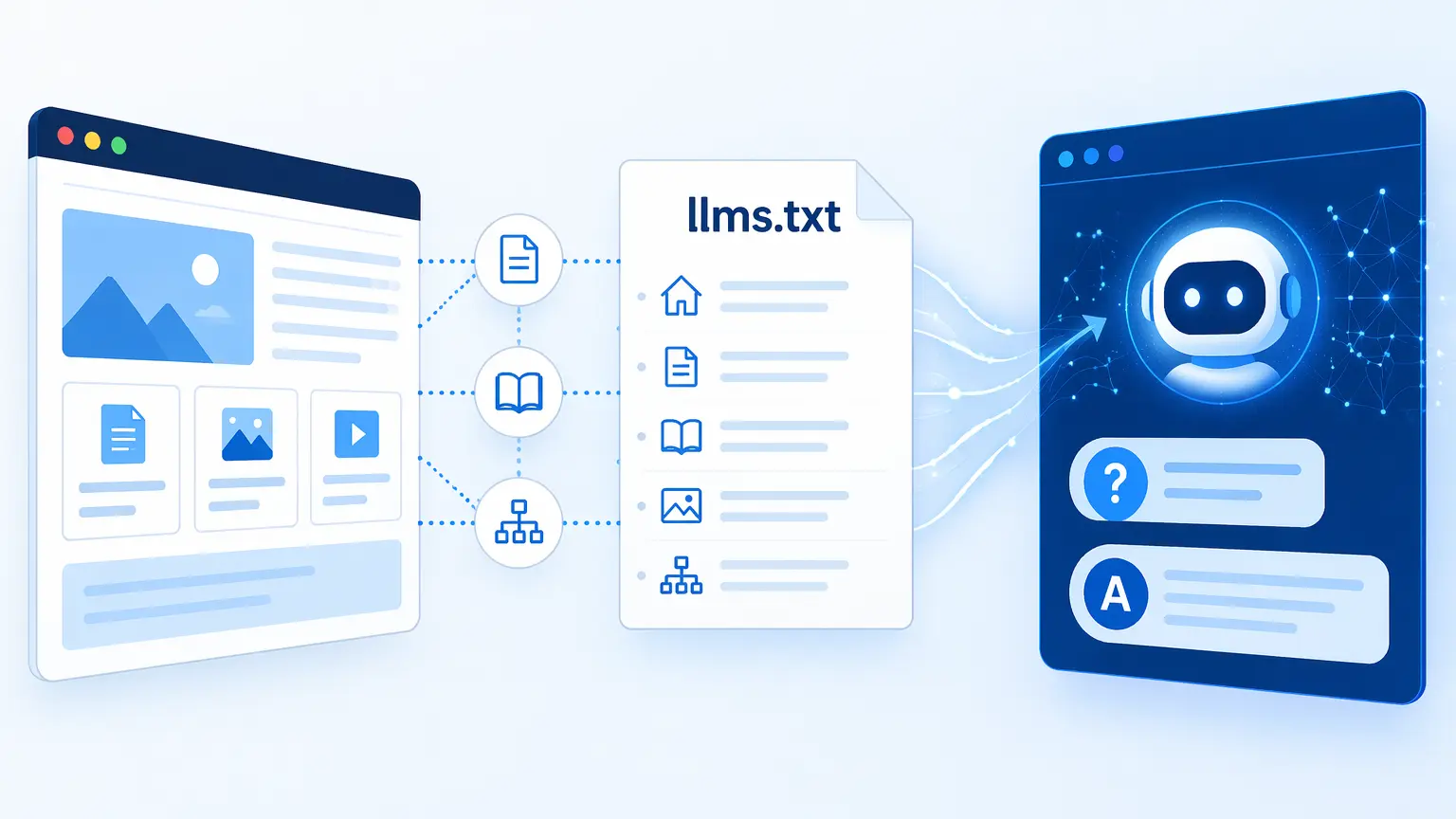
It is intended to give large language models a simple overview of the website and direct them toward its most useful content.
The idea was proposed in September 2024 by Jeremy Howard. The proposed format uses Markdown, which is a clean text format containing headings, descriptions, and links. (llms-txt)
You can think of llms.txt as a short guide to your website.
It might tell an AI system:
- What the website or business is about
- Which services or products are most important
- Which pages contain the best information
- Where to find documentation, FAQs, articles, or other resources
It is sometimes compared to robots.txt or an XML sitemap, although those files serve different purposes.
A robots.txt file controls crawler access. An XML sitemap helps search engines discover URLs. An llms.txt file is intended to give AI systems a cleaner, more useful summary of the website.
Does llms.txt Actually Help With AI Search?
This is where the answer becomes less certain.
At this point, llms.txt is a proposed convention. It is not a universal web standard, and there is not strong public evidence showing that adding it will improve rankings, citations, or traffic from AI systems.
Google specifically says that its search systems do not use llms.txt for Google Search, AI Overviews, or its other generative search features. Google says adding the file will neither help nor hurt a website’s visibility in Google Search. (Google for Developers)
That does not necessarily mean every AI platform or AI agent will ignore it.
Other AI tools, crawlers, browser agents, and future systems may use the file as a convenient guide. The proposal is still relatively new, and the way AI systems access websites continues to change.
That is why I see llms.txt as a reasonable low-cost experiment.
I would not tell a business owner to spend thousands of dollars creating an elaborate llms.txt strategy. However, when an established WordPress plugin can generate one automatically, turning it on is a fairly easy decision.
It might help.
It should not hurt.
And if AI systems begin relying on it more heavily later, your site will already have one.
How to Add llms.txt Using Yoast SEO
If your WordPress website already uses Yoast SEO, this is probably the easiest option.
Yoast can automatically create an llms.txt file in the root directory of your website. It also updates the file weekly. (Yoast developer portal)
To enable it:
- Log in to your WordPress dashboard.
- Go to Yoast SEO.
- Click Settings.
- Open Site Features.
- Find the AI tools section.
- Find LLMS.txt.
- Turn the feature on.
- Click Save changes.
Yoast also lets you manually select which pages appear in the file.
To do that:
- Return to Yoast SEO → Settings → Site Features.
- Open the llms.txt settings.
- Choose Customize llms.txt file.
- Select Manual page selection.
- Add the pages you want included.
- Save your changes.
Yoast recommends updating to its latest version if you do not see the setting. The feature is not currently available for WordPress multisite installations. (Yoast)
After enabling it, visit:
https://yourdomain.com/llms.txt
Replace yourdomain.com with your actual domain.
You should see a text file containing information and links from your website.
Which pages should you include?
Do not treat llms.txt as a list of every URL on your website. That is what an XML sitemap is for.
Focus on pages that help someone quickly understand the business.
For a typical service business, that might include:
- The homepage
- The main services page
- Individual pages for important services
- The About page
- The Contact page
- A pricing or process page
- A frequently asked questions page
- Important guides or resources
- A service area or locations page
Choose pages that answer real questions and clearly explain what the company does, who it helps, where it works, and why someone should choose it.
Other WordPress Options
Yoast is not the only way to create an llms.txt file.
There are standalone WordPress plugins that generate and manage the file. Several are currently available in the official WordPress plugin directory. (WordPress.org)
Before installing another plugin, check whether your existing SEO plugin already supports llms.txt. There is no reason to add another plugin when your current one can handle the job.
You can also create the file manually.
To do that, create a plain-text file named:
llms.txt
Upload it to the root directory of your website, usually the same directory containing files such as wp-config.php, robots.txt, or index.php.
The finished file should then be available at:
https://yourdomain.com/llms.txt
Be careful when doing this if a WordPress plugin is already generating the file. You do not want multiple plugins or a manual file competing to control the same URL.
Use AI to Create Your llms.txt File
You can also ask an AI tool to review your website and prepare the file.
The quality of the result will depend heavily on how well your website explains the business. AI cannot organize information that does not exist or correct information that is inaccurate.
Here is a prompt you can use:
Prompt to generate an llms.txt file
Review the following website:

[INSERT WEBSITE URL]

Create an llms.txt file for this website using clean Markdown.

The file should help AI assistants understand the website, business, services, audience, expertise, locations, and most important resources.

Include:

The exact business or website name as the main heading.

A short, factual description of what the business does.

The primary audience or types of customers served.

The primary products or services.

The geographic area served, when applicable.

Links to the most important pages.

A short, accurate description after each link explaining what that page contains.

Separate sections for services, company information, resources, FAQs, locations, and contact information when those sections apply.

Only valid, publicly accessible URLs from the website.

No marketing hype, invented claims, unsupported statistics, or information that cannot be verified from the website.

Prioritize the most useful and authoritative pages rather than listing every page.

Format the result as the complete contents of an llms.txt file. Do not include an introduction or explanation outside the file.
After generating the file, review every statement and URL manually.
Make sure the AI did not:
- Invent services
- List outdated pages
- Misstate your location
- Include staging or test URLs
- Make unsupported claims
- Link to thin or unimportant content
- Omit an important service or FAQ page
AI can prepare a good first draft, but a human should approve the final version.
A Basic llms.txt Example
A small service business might use something like this:
# Example Heating and Cooling

> Example Heating and Cooling provides residential furnace, air conditioning, and indoor air quality services in Madison, Wisconsin, and surrounding communities.

## Services

- [Heating Services](https://example.com/heating/): Furnace repair, maintenance, replacement, and installation.
- [Air Conditioning Services](https://example.com/air-conditioning/): Air conditioning repair, maintenance, and installation.
- [Indoor Air Quality](https://example.com/indoor-air-quality/): Humidity control, filtration, and indoor air quality solutions.

## Company Information

- [About Us](https://example.com/about/): Company history, qualifications, and service philosophy.
- [Service Area](https://example.com/service-area/): Communities and geographic areas served.
- [Contact Us](https://example.com/contact/): Contact information and service request options.

## Resources

- [Frequently Asked Questions](https://example.com/faqs/): Plain-English answers to common heating and cooling questions.
- [Blog](https://example.com/blog/): Maintenance advice, troubleshooting tips, and educational articles.
The file does not need to be complicated.
In fact, a short, accurate file is likely more useful than a large file filled with every archive, tag, author, attachment, and low-value page on the site.
Do Not Confuse llms.txt With robots.txt
Despite the similar filenames, llms.txt and robots.txt are not replacements for one another.
- Your robots.txt file tells web crawlers where they are allowed or not allowed to go.
- Your llms.txt file provides a suggested guide to important content.
Adding a page to llms.txt does not guarantee that an AI system will crawl it, use it, trust it, cite it, or include it in an answer.
Similarly, leaving a page out of the file does not necessarily prevent an AI system from finding it through normal links, search indexes, sitemaps, or other sources.
Think of llms.txt as an optional directory, not an access-control system.
Should Every Website Have One?
I think most established business websites can reasonably add one, especially when their SEO plugin already includes the feature.
However, llms.txt should remain far down the priority list compared with more important work.
Do not delay improving your service pages, fixing technical problems, gathering reviews, building useful resources, or answering customer questions because you are busy perfecting an llms.txt file.
A website with weak content and an excellent llms.txt file still has weak content.
The file can point AI toward your answers, but it cannot create those answers for you.
The Better AI Search Strategy: Answer Real Questions
The best tactic for showing up in AI search is not creating a special file, although any content in a form that AI can use IS helpful, of course.
It is publishing clear, useful, trustworthy information that directly answers the questions your customers ask.
That is why I believe good FAQ pages are one of the strongest investments a business can make for both traditional SEO and AI search.
AI systems are built around questions and answers.
People ask:
- How much does this service cost?
- How long will it take?
- Do you serve my city?
- What is included?
- What happens if something goes wrong?
- Is this the right service for my situation?
- What should I do before I call?
- Why should I choose your company?
Your website should answer those questions in plain English.
Avoid vague, promotional answers such as:
- We offer innovative solutions customized to exceed the needs of every client.
That says almost nothing. A useful answer sounds more like this:
Most residential furnace replacements take one working day. Larger systems, ductwork changes, or unexpected electrical work can extend the project into a second day. We will explain the expected schedule before work begins.
That is the kind of content humans understand, search engines can index, and AI systems can quote or summarize.
Create one strong general FAQ page, but also add relevant FAQs to individual service pages.
A furnace repair page should answer furnace repair questions. A website design page should answer website design questions. A personal injury page should answer questions related to that specific legal service.
The closer the answer is to the relevant service, the easier it is for both people and machines to understand the context.
My Recommendation
Turn on llms.txt if Yoast or another trusted plugin makes it easy.
Check the file to make sure the content and links are accurate.
Then move on.
Do not treat it as a secret AI search weapon. Do not expect instant rankings, leads, or citations. Do not let someone sell you an expensive llms.txt optimization package without evidence that it will produce a meaningful result.
AI search is still relatively new. The systems, standards, crawlers, and recommendations will continue changing.
Adding llms.txt is a small way to prepare for what may come next.
But the durable strategy remains the same:
Create a technically sound website filled with original, useful information that answers real customer questions clearly.
Start with your FAQ pages.
That will likely do far more for your visibility than any single text file.
Frequently Asked Questions About llms.txt
What does llms.txt stand for?
The name refers to large language models, commonly abbreviated as LLMs. The file is intended to help these systems locate and understand important website content.
Where should the llms.txt file be located?
It should be located in the root of the domain and available at a URL such as https://example.com/llms.txt.
Is llms.txt required for SEO?
No. It is not required for traditional SEO, and Google says it does not use llms.txt for Google Search or its generative AI search features. (Google for Developers)
Will llms.txt improve my Google rankings?
Google says the file neither helps nor hurts rankings or visibility in Google Search. Other AI platforms or agents may choose to use it, but there is currently no guarantee that it will improve visibility.
Can Yoast SEO create llms.txt?
Yes. Current versions of Yoast SEO include an llms.txt feature that can automatically generate the file and update it weekly. (Yoast)
Can I create llms.txt manually?
Yes. You can create a plain-text Markdown file, name it llms.txt, and upload it to the root directory of your website.
Should llms.txt list every page on my website?
Probably not. Focus on your most important, useful, and authoritative pages. Your XML sitemap is better suited for listing all indexable URLs.
Is llms.txt the same as robots.txt?
No. Robots.txt manages crawler access. Llms.txt is an optional guide that points AI systems toward important content.
What is more important than llms.txt for AI search?
Helpful original content, crawlable pages, clear website structure, strong service pages, accurate business information, and plain-English answers to common customer questions are all more important.
Are FAQ pages good for AI search?
Well-written FAQ pages can make it easier for AI systems and search engines to find direct answers to specific questions. They are also useful to human visitors, which should remain the primary goal.
📄 Download a PDF of This Article