How Do You Rank on Google?

TL;DR Summary: Google doesn’t rank pages based on how “nice” your content looks. It matches real searches to pages that prove they’re useful. Keyword research shows you what people actually type into Google and what they’re trying to do. Topical authority comes from consistently winning clicks across related queries. Pages – not domains – compete for those queries, so you need clear targets for each page, avoid cannibalization, build topical bridges into adjacent topics, and earn proof of usefulness through links, clicks, and strong user behavior.
How Google Really Decides What Ranks (and Where Keyword Research Fits In)
There’s a lot of mythology around how Google ranks pages. People talk about “topical authority,” “domain authority,” and “quality content” like there’s a secret score somewhere you just have to unlock.
In reality, the system is a lot more mechanical than mystical. That’s good news, because mechanical systems can be reasoned about.
Here’s the simple version:
- Every keyword you type into Google drops you into a topical space.
- Every key phrase you consistently get clicks for inside that space is topical authority.
- Keyword research is how you see those spaces and the questions people actually ask.
- Pages, not domains, do the real fighting in the rankings.
- Google doesn’t reward content in isolation. It rewards proof that your content is useful: links, clicks, and behavior.
I’ve seen this play out over and over. I’ve had sites with posts about everything. Certain pages skyrocketed in traffic even when the domain itself wasn’t anything special. Why? Because those pages:
- Matched real searches people were typing in, and
- Proved themselves useful through clicks, time on page, and links.
Google wants to provide the best results. The minute they stop doing that, people will go elsewhere. So let’s talk about what “best” really looks like from Google’s point of view – and how keyword research fits into that picture.
What Google Is Actually Trying to Do
Google is not a content appreciation engine. It’s not reading your post like a human editor and giving you points for clever metaphors and clean transitions.

Google is a utility engine. Its job is to take someone’s question and return a set of pages that are likely to be useful for that question. That’s it.
Because the web is huge, it can’t hand-score everything. So it relies on scalable signals:
- Relevance: Does this page look like it’s about the thing the user typed?
- Authority: Do other pages and sites point to it?
- Behavior: What do people do after they click it?
Keyword research plugs into that first piece: relevance. It’s how we stop guessing and start lining up content with the actual words and intents searchers use.
What is Topical Authority?
Topical authority gets talked about like some invisible crown you earn after publishing 47 posts on a topic. Let’s strip that down.
Topical authority is simply this: you consistently win impressions and clicks across a cluster of related queries.
From Google’s perspective:
- People search for a topic.
- Your pages show up, get clicked, and satisfy those people often enough.
- The system “learns” your site tends to be a good answer inside that topical space.
Keywords Are Real Questions, Not Magic Phrases
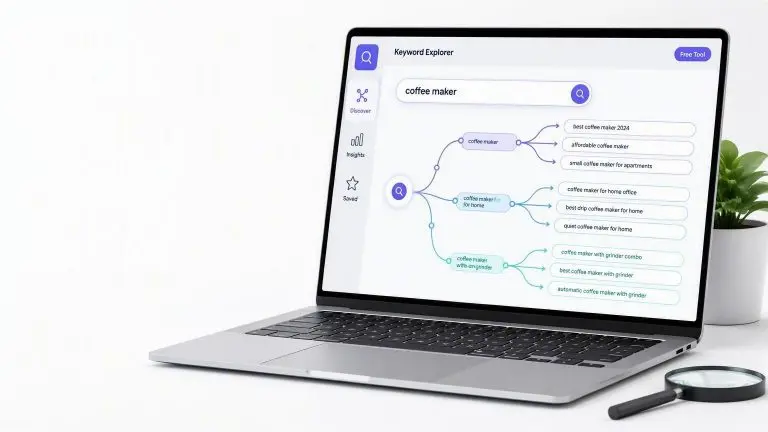
Keyword research is how we see those topical spaces from the outside. A keyword isn’t just a string of words – it’s a question someone is asking Google.
When you run keyword research around a topic, you’re basically asking:
- What are all the questions people are actually typing in?
- How often are they asked?
- How hard is it to be a reasonable answer in this crowd?
This is step one for building topical authority: know the questions before you start writing answers.
Turning Keyword Lists into Real Topics
A raw keyword list is just noise until you organize it. The move is to group keywords by intent and outcome.
For a given theme, like “YouTube TV blackout” or “streaming alternatives,” you might see keywords such as:
- why is abc not working on youtube tv
- youtube tv abc blackout
- how to watch monday night football if i have youtube tv
- how to watch local channels without cable
- best alternative to youtube tv
They’re all related, but not identical. You can group them like this:
- Problem / “what happened?” queries: why is ABC not working, blackout questions.
- Solution / “how do I fix it?” queries: how to watch Monday Night Football, how to watch local channels.
- Comparison / “what else can I use?” queries: best alternative to YouTube TV.
Now you’re thinking in topical clusters, not single keywords. Each cluster is a small “chapter” inside your broader topic. That’s what you build content around.
Why Pages (Not Domains) Actually Rank
PageRank was designed as a page-level system. Pages accumulate their own authority, their own relevancy, their own little map of incoming and outgoing signals.
The domain matters – it gives a baseline of trust – but there is no “this domain ranks for X” switch that flips on. Pages compete. Sometimes your pages compete with each other.
That’s where cannibalization shows up: multiple pages from the same site go after the same or very similar keywords and block each other from being the clear winner.
Use Keyword Research to Prevent Cannibalization
Here’s where keyword research is quietly huge:
- Instead of writing “whatever sounds good” and hoping Google sorts it out, you assign keywords and intents to pages before you write.
A simple workflow:
- Do keyword research around your topic.
- Group keywords into clusters by intent (informational, how-to, comparison, buyer intent, etc.).
- For each cluster, pick one primary page that will own that main query.
- Use related, smaller keywords as:
- Subheadings within that page, or
- Supporting posts that clearly target a different angle and link back.
When you do this, you’re telling Google: “For this type of question, this is the page that should show up.” You’re not making Google choose between three half-overlapping articles you wrote over two years.
Topical Bridges: Expanding into New Areas Safely
Topics on the web are not clean silos. They overlap in weird ways. People who search for one thing often search for something adjacent. That overlap is where “topical bridges” live.
If you’re strong in Topic A and you want to move into Topic B, you don’t teleport. You build bridges.
Finding Bridges in the SERP and Keyword Data
Keyword research and the SERP itself show you these bridges if you look for them:
- People Also Ask boxes: These questions often point sideways into related topics.
- Related searches at the bottom of the page: These are literal “people who searched this also searched that.”
- Keyword tool suggestions: When you see your main topic alongside another concept over and over, that’s a bridge.
Example:
- You start with “YouTube TV blackout.”
- You notice related queries and PAAs (People Also Ask) about “how to watch local channels without cable” and “best streaming alternatives.”
Those are your bridges into broader streaming topics, cord-cutting guides, and specific alternatives (like CUE, Philo, etc.).
The move is to:
- Create content that answers the bridge query directly.
- Link from your original topic pages to those bridge pages (and back).
- Keep the bulk of your content in your core topic while gradually stretching into the new space.
That’s how you expand your topical footprint without confusing Google about what your site is “about.”
Google Is a Utility Machine, Not a Content Critic
Let’s go back to behavior for a second.
If someone types “free streaming tv no credit card” and lands on a page that makes them pull out a credit card on step one, they’re gone. If someone types “what is topical authority” and hits a sales page that doesn’t explain anything, they bounce.
Google sees that kind of thing over time. The page looks relevant on the surface (keywords match), but behavior says otherwise.
This is where keyword research and intent come together:
- Informational queries want clear explanations and examples.
- How-to queries want steps, screenshots, or a checklist.
- Comparison and “best” queries want options, pros/cons, and clarity on which is right for whom.
- Buyer-intent queries want the offer, price, and a low-friction way to take action.
If your content respects the intent behind the keyword, you’re more likely to get good behavior signals: people stay, they scroll, they click deeper, they come back.
Links, Clicks, and Proof of Usefulness
Backlinks still matter, but not as trophies. They matter because they’re real-world endorsements:
- Someone found your page useful enough to point other people at it.
Clicks matter for the same reason:
- People choose your snippet in the SERP.
- They don’t bounce back immediately.
- They may search again and click you again later.
When you combine:
- Pages that are clearly aligned with real keywords and intent,
- Internal links that make it easy to move around your topical space, and
- External links that send new visitors in,
…you give Google the kind of proof it can actually use. The engine doesn’t reward content quality in isolation. It rewards the echo of that quality: links, clicks, repeat interactions.
A Simple Operating System for Content That Ranks
If you want a simple, repeatable way to work with all of this, here’s a recipe you can follow.
- Choose your topical lane.
Use keyword research to make sure:- There’s enough demand.
- You understand the main questions and subtopics.
- Cluster keywords by intent.
Group your keywords into:- Informational (“what is”, “why”, “how does”).
- How-to / problem-solving (“how to fix”, “how to watch”).
- Comparison & “best” queries (“best X for Y”, “X vs Y”).
- Buyer intent (“pricing”, “near me”, “buy”, “sign up”).
- Assign each cluster to a primary page.
Decide which page is allowed to target which core keyword. Supporting keywords become:- Subsections on that page, or
- Supporting pages with clearly different angles (and links back).
- Write for the actual query and intent.
Don’t write the article you feel like writing and slap a keyword on it later. Start with:- “If I typed this keyword into Google, what answer would I hope to see?”
- Then build that answer, with structure that helps scanning and depth that actually solves the problem.
- Build topical bridges on purpose.
As you grow:- Use People Also Ask, related searches, and keyword tools to find adjacent topics.
- Create bridge content that naturally connects your existing topics to new ones.
- Link both directions to help users and Google understand the relationship.
- Promote the pages that matter.
Not every page needs outreach. Focus your link-building and promotion on:- Big-picture authority pieces (like this one), and
- High-intent pages that can actually drive leads or sales.
- Watch the proof, not just rankings.
Rankings are noisy. Watch:- Which pages are gaining impressions and clicks for the keywords you targeted.
- Which topics are growing over time.
- Where behavior looks strong (time on page, depth, repeat visits).
Stick with that system long enough and you’ll see certain pages start to pull away. That’s topical authority in action. Simple, not easy.
Final Thoughts: Stop Guessing, Watch the Proof
When you strip away the hype, Google’s ranking system is surprisingly straightforward:
- Keyword research tells you what people actually want.
- Your pages are your answers to those questions.
- Topical authority is simply winning clicks and satisfying searchers inside a topic.
- Links and behavior are the proof that your content is doing its job.
Google wants to provide the best results. The minute they stop doing that, people will go elsewhere. Your job is to become the best result for the queries you choose, then back that up with proof.
No magic. Just paying attention, publishing consistently within your topical space, and using keyword research as your radar instead of writing in the dark.
Glossary of Terms
Topical Authority
The strength and credibility your site (and its pages) have within a specific topic, based on how often your pages appear, get clicked, and satisfy users for related queries.
Keyword Research
The process of finding and analyzing the words and phrases people type into search engines so you can create content that matches their questions and intent.
Search Intent
The underlying reason behind a search query – for example, wanting information, looking for a solution, comparing options, or being ready to buy.
Keyword Cluster
A group of related keywords that share a similar topic or intent and can often be served by one main page (plus supporting pages, if needed).
Cannibalization
When multiple pages on the same site target the same or very similar keywords, forcing Google to choose between them and often weakening your overall performance.
Topical Bridge
A keyword or piece of content that naturally connects one topic to an adjacent topic, letting you expand your authority into new areas without confusing Google.
PageRank
Google’s original link-based algorithm for measuring the importance of individual pages based on the number and quality of links pointing to them.
Behavior Signals
Data about how users interact with your site (such as clicks, time on page, and repeat visits) that helps Google infer whether your content is useful.
📄 Download a PDF of This Article