Why Is Posting a Pin on Pinterest So Frustrating in 2025?
 Reading Time: 4 minutes
 The Struggle Is Real
Remember when posting a pin used to be simple? Upload an image, write a description, add your URL, done. Now? It feels like you’re solving a Rubik’s cube in the dark while Pinterest randomly moves the stickers.
In 2025, Pinterest has somehow made it harder to do the one thing the platform was literally created for: posting a pin. Seriously, like where in the world is the plus button to post a pin. I CANNOT find it!
Let me walk you through the “current” experience (spoiler alert: it’s not great).
Where’s the Button, Pinterest?
You click “Create” expecting to get started right away… but wait, which one do you choose?
The plus sign gives me this… like, for real? Seriously? Are your totally drunk?
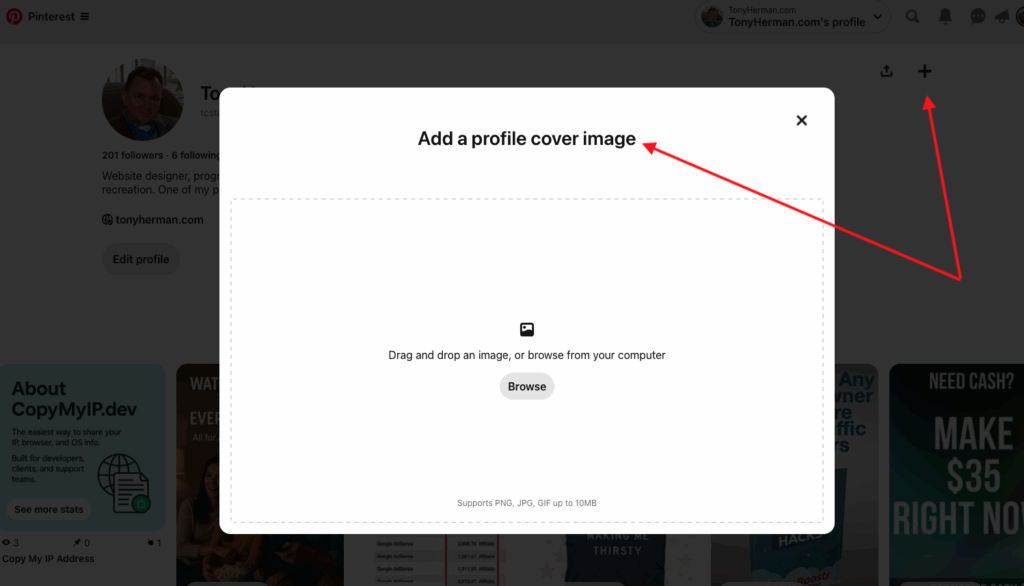
- Create Pin – cool, that’s what we want.
- Idea Pin – no thanks, I’m not trying to be a full-time content creator right now.
- Create Ad – let me just throw money at it instead? 🙄
Oh, and if you’re on mobile? Good luck. The app loves hiding buttons in menus that feel like escape room puzzles.

Too Many Fields, Not Enough Clarity
Once you finally get to the Create Pin screen:
- What’s this “alt text” field doing here? Why is the character limit the length of a tweet from 2008?
- Why is it cropping my beautiful, perfectly designed vertical image?
- What’s the best size for a pin now—2:3 or 1000:1500 or “trust your intuition”?
And for the love of all things good, why is the URL field so easy to forget when you’re jumping between tabs grabbing your link?
Just Let Me Link It!
Oh, and now Pinterest’s Idea Pins don’t let you include a direct link? Unless you’re using the “shop” feature or applying to be something that sounds like an influencer intern? I’m just trying to link to my blog post. Why is that controversial?
Go Back to Your Roots, and I’m NOT Alone…
Pinterest used to be simple. You found something cool, hit “Pin It,” and moved on with your life. But today? Good luck figuring out where to even go to post a pin.
It’s like the feature got grounded and sent to its room without dinner.
To be clear—yes, you can still create pins (I found it… finally – like, holy buckets). But the process now feels hidden, clunky, and frustrating. Especially for long-time users or marketers who just want to post from desktop.
Instead of surfacing the “Create Pin” link where it belongs—front and center—Pinterest is pushing Idea Pins and product listings. That might work for big brands, but for regular creators and bloggers trying to drive traffic? It’s a hot mess.
If Pinterest wants to stay relevant, it should embrace simplicity again. Let us pin. Let us share. Let us do the thing the platform was built for.
Until then? Go home, Pinterest. You’re drunk.
Final Thoughts: Pinterest, Please Listen…
If Pinterest wants creators to keep sharing great content, they need to make the actual sharing part easier.
Because right now, posting a pin feels like:
- Fighting against an interface designed by UX chaos goblins
- A test of patience
- And a reminder of why we all took a break from Pinterest for two years
Bonus: What Should Happen (My Wishlist)
- One-click upload with pre-filled templates
- Auto-link detection from the image’s metadata or file name
- Pin scheduling without a third-party tool
- A “last used board” auto-fill because yes, I do keep posting to the same board
- A big red button that just says “POST IT”
- Bring in a little AI maybe… hmm?
Want to scream into the Pinterest void with me? Drop a comment below with your weirdest glitch, most rage-inducing moment, or when you gave up trying to post a pin.
Let’s fix this, one rant at a time. Go home, Pinterest, you’re drunk 🙂
Seriously, like fill up the comments here… tell me how to pin on Pinterest. I’m so lost.
📄 Download a PDF of This Article