How to Rank Your Website Using Keywords

TL;DR Summary: Optimize your website for higher rankings by targeting low Keyword Difficulty (KD) and high Search Volume (SV) keywords, including long-tail phrases. By focusing on these overlooked keywords, you can drive more traffic to your site and improve your ranking for related keywords. Simply create or optimize pages with targeted keywords in strategic locations like headings, titles, and meta descriptions to enhance visibility and attract clicks. Keep it simple and consistent to establish your site as an authority in your niche. Ready to boost your website's performance? Dive into the full guide below.
I’m going to break down exactly how to get your website ranking higher, and you’ll use keyword data. You’re simply going to do 2 things:
- Look for low Keyword Difficulty (KD)
- Look for high Search Volume (SV)
- BONUS: Long-tail (4 or more words in the keyword phrase)
Here’s an example of how that looks using a keyword tool:
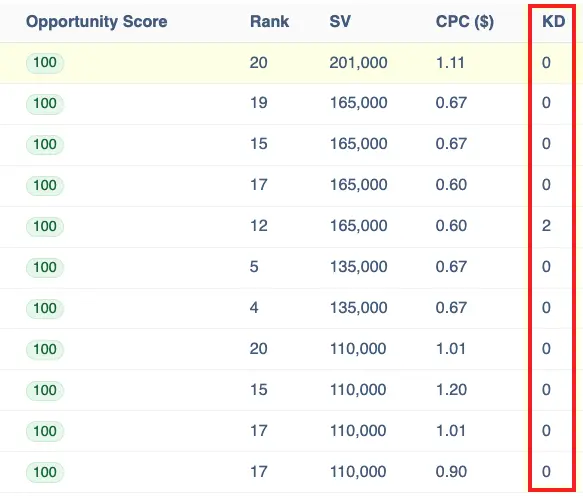
The top keyword in this example has a Keyword Difficulty (KD) score of 0 and high Search Volume (SV). That’s definitely a 100 for Opportunity Score. They are simply keywords that everyone else is ignoring.
When you optimize for these keywords, you’ll unlock more traffic to your website and increase the ability to rank for more keywords (halo/related keywords). It’s that simple.
How Do You Optimize for These Keywords?
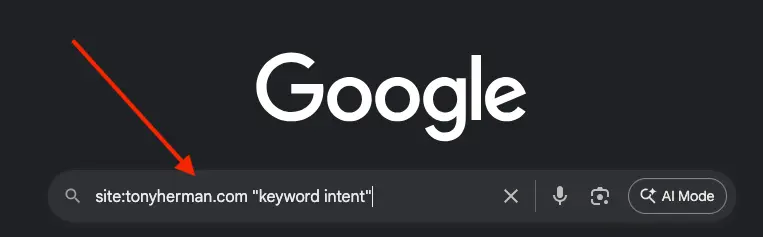
The first thing is to figure out if you have a page for a particular keyword already. You should know, but you can easily find this out by going to Google and typing in “site:[yourdomain.com]” plus the keyword in quotes, like this:
And then you’ll see the results:
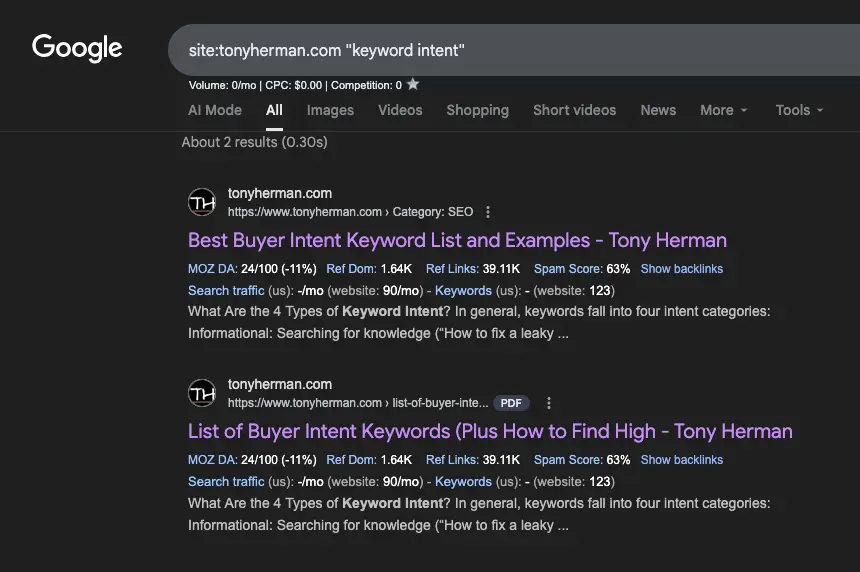
Choose the better of those two pages. If you don’t have a good page for that keyword, then you’ll need to create a new page – either a landing page or a blog post, depending on how critical that keyword is to your business. If it’s critical, then do a landing page.
Next, optimize the page:
- Put the keyword in the H1 (heading 1) of the page – not verbatim all the time, but you can – or something very close. And just don’t use the keyword by itself, but make a small sentence or phrase with it.
- Put the exact keyword phrase (the best you can without making it look un-natural) at the very beginning of the HTML title tag. You can see my examples above: “Best Buyer Intent…”
- Put the keyword in the first sentence of the article.
- Put the keyword in the last sentence of the article.
- Include a similar keyword in the meta description.
And then make the HTML title and meta description compelling – make people want to click. Create an open loop. See my example. People think, “I need to see this list” so they click and go to those pages.
And… That’s It
That’s all you do. It’s not difficult. It’s content – you know, that thing, like a salesperson, that keeps working for you 24/7 once you publish it. Post lots of good content. Doing that still works. I imagine it always will. Don’t overthink it. Every piece of content you add to your website makes your website look like more of an authority on that topic. And, the more content you post, the better chance of your site having that exact phrase that someone just typed into Google. That makes your page a contender for a good result.
📄 Download a PDF of This Article