How to Create a Venmo Link or Donation Form

TL;DR Summary: Need an easy Venmo link to share? Easily create Venmo payment links for your website, for texting or even for donations. Sending Venmo links online can be tricky with QR codes. Learn how to generate clickable Venmo links for websites, emails, and forms using a free tool. Simplify donations on your site without QR codes or apps. Try the Venmo Link Builder tool now.
Create a Venmo Payment Link
Create a Venmo Sign With a QR Code:
Create a simple printable sign with a QR code - great for garage sales. Put in your username above and add a note if you like. The last 4 digits of your phone number are optional, but Venmo may ask people to confirm them, so it's best to include it.
Create a Venmo Donation Form for Your Website:
Use the same info above to generate a ready-to-paste HTML embed form for any website (WordPress, Wix, Squarespace, etc.).

Steps to Easily Create and Send a Venmo Link
If you’ve ever tried to send someone a Venmo link – like a real, clickable link you can paste into an email, a form, or a webpage—you’ve probably hit a wall. I did, too, so I build a tool – right on this page.
The Problem: Venmo Pushes QR Codes… But That’s Not Always Useful
You open the app and try to find a way to copy a payment link. Instead, you’re shown a QR code. That’s fine if you’re standing in front of someone at a coffee shop, but what about when you’re online?
I wanted to make a simple Venmo “Pay Me” link for my website. I figured there had to be an official tool to do that. Spoiler alert: there isn’t. Or at least, not one that’s easy to find or clearly documented.
I Searched for Answers—But They Weren’t Great
I googled everything from:
- “venmo pay link”
- “can I create a payment link with Venmo?”
- “how do I send a Venmo link in a form?”
…and I got a mix of outdated Reddit threads, general payment advice, and roundabout workarounds. No direct answer. Nothing that clearly said, “Here’s the format, and here’s how to generate it.”
It’s free, takes two seconds, and gives you a fully working Venmo link you can copy and paste anywhere.
Just enter:
- Your Venmo username
- An optional amount
- An optional message
Then copy the link or test it in a new tab.
No login. No app. Just a working URL that looks like this:
https://venmo.com/YourUsername?txn=pay&amount=12¬e=LunchYou can paste it in a Google Form, add it to a button on your website, or drop it into an email. Done.
Want to Let People Donate to You on Your Website via Venmo?
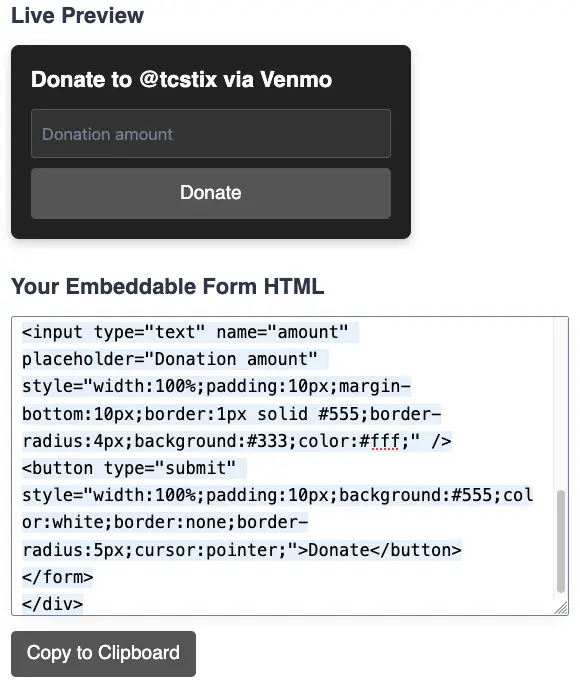
If you run a nonprofit, blog, Twitch channel, or any kind of project that takes donations, this next part is for you.
You can now use the tool above to generate an embeddable donation form that lets people enter any amount and donate to your Venmo directly—no QR codes, no apps, no confusion.
This is especially helpful if you want to add a donation option to a Google Form, thank-you page, or blog footer.
Here’s how it works:
- Enter your Venmo username above
- Choose a style that fits your site (light, dark, or minimal)
- Click Generate HTML
- Copy the code and paste it anywhere—WordPress, Squarespace, even in a newsletter
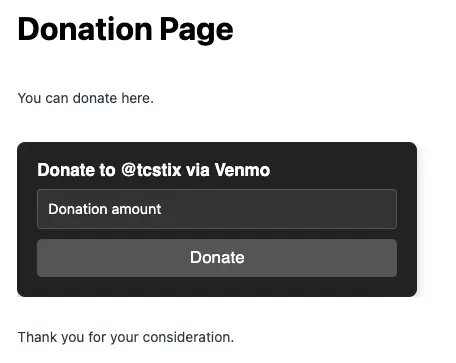
The form will look something like this:
Donate to @YourUsername via Venmo
[ $amount field ] [ optional note ] [ Donate button ]
When someone clicks the button, they’re taken to Venmo with the amount and note already filled out. It works great on mobile and desktop.
How to Add the Form to Your Web Page in WordPress
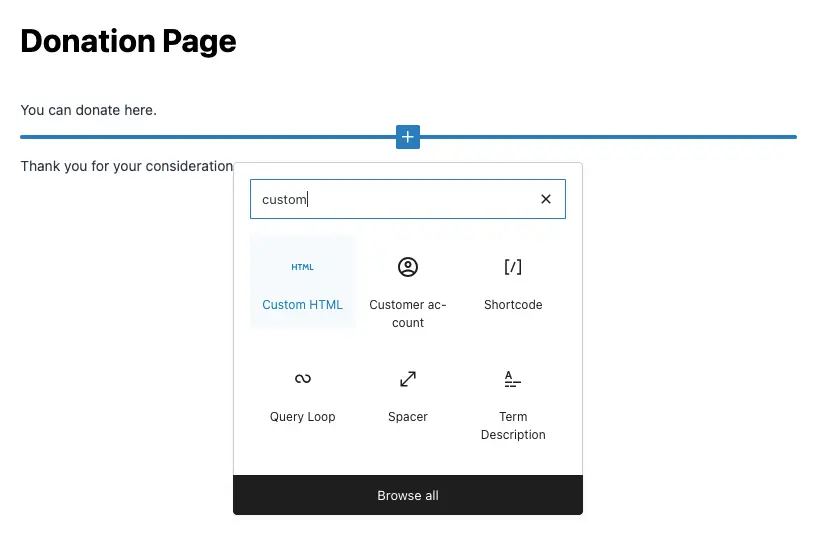
Simply go to where you want the form to be on your site, add the Custom HTML block by searching for it, and paste in the code.
First, add a block and search for “Custom HTML” as shown here:
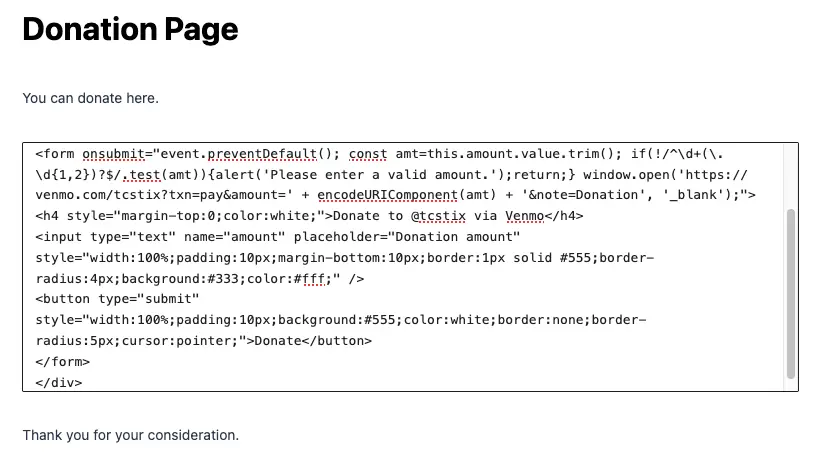
Next, click that and paste in the code from the Venmo Donation Form Tool:
Next, click in the code area, then on the Preview link:
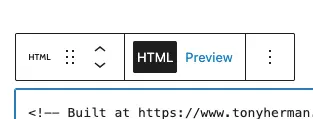
You’ll then see how the form will be seen on your page. You can change it and center it if you like:
FAQs About the How to Send a Venmo Link
Can I create a link to my Venmo?
Yes. Just use this format: https://venmo.com/YourUsername. Add ?txn=pay&amount=XX¬e=YourNote if you want to pre-fill details.
How do I add a Venmo link to a Google Form?
Paste your link into a short answer field description or hyperlink it in a section description. Easy.
How do I send a payment request link?
Change txn=pay to txn=charge in the URL and send it to whoever owes you.
How do I get my Venmo link?
Use the tool. Or manually type it out as explained above.
Can I find someone else’s Venmo link?
If you know their username, it’s just https://venmo.com/TheirUsername.
Final Thoughts
If you’re trying to collect money online and want something cleaner than a QR code, this tool makes it simple. It works with Google Forms, websites, newsletters, and anywhere you can paste a URL.
📄 Download a PDF of This Article