Is Optimizing for Keywords Still a Thing?

TL;DR Summary: Optimize your content with strategic keyword research to attract the right audience. Focus on long-tail keywords for better results, create targeted content, and enhance your SEO efforts. Learn how to write impactful content that resonates with your audience and boosts your website's visibility. Ready to take your content to the next level? Dive in for expert tips and practical strategies.
Yes, doing (easy) keyword research is like taking a reading on a map before your journey – or using GPS, you could say. If you don’t use that, you’ll end up in the wrong place. Your content needs to match up with what people are searching for – plain and simple.
One, Big Red Flag With Keyword Research
I’m building a keyword research tool right now. It’s almost ready to launch. To test it, I’ve ran lots of reports. With most sites, I’m seeing 100 keywords they’re ranking for easily. But, some sites only have like 20. That means there’s not enough content on the site. No keywords = not enough content.
Which Keywords to Go After
Do not go after the keywords with the most search volume – especially if you’re just starting out doing SEO (search engine optimization). Go after the long-tail keywords with medium to low search volume. They are easy to get. Just write a good article about that keyword. I’ll get into that in a minute, but I wanted to first show you examples of long-tail keywords from this tool I’m building.
This is for a company that does basement stuff – waterproofing, repair, restoration, etc. Here are their long-tail keyword suggestions:
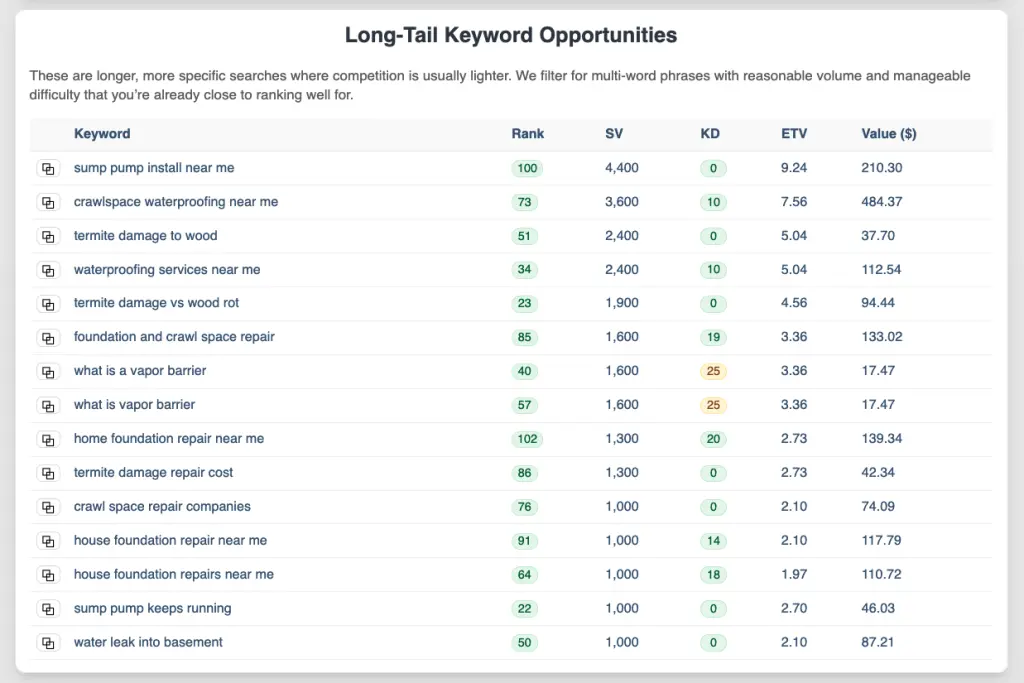
With the most search volume are the “near me” keywords and I’ve written a few articles about that. Hint: do not try to write content with “near me” as that does not work. The keywords above have really good search volume with relatively low keyword difficulty (KD).
Next, is quick keyword wins. Here’s another screen shot with the same website:
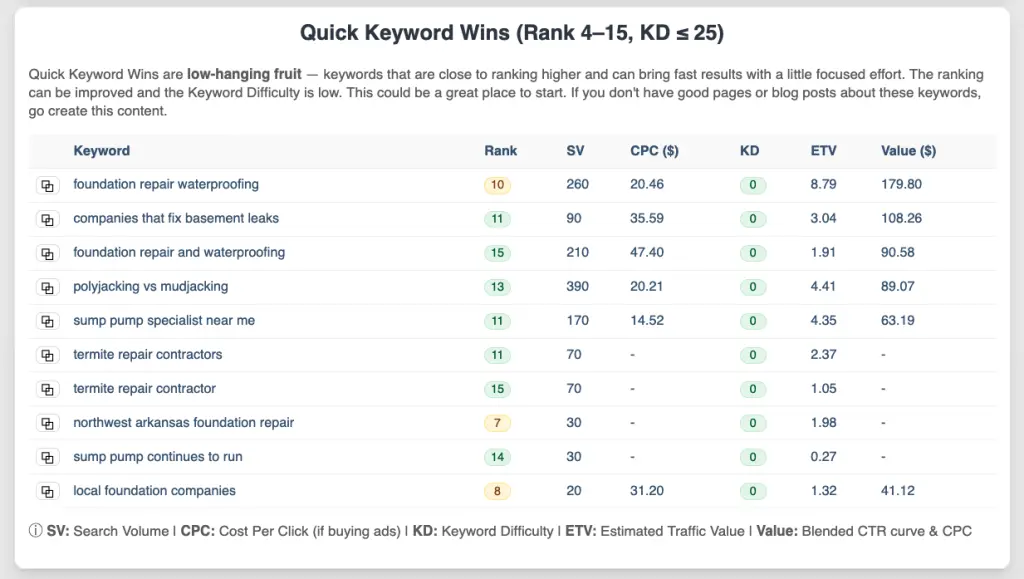
So, right near the top is “companies that fix basement leaks” and I like that one. It’s people looking to get that service right now – great buyer intent. And there are 390 searches for “polyjacking vs mudjacking” which are people that are just interested in the services, but adding content to your website with those keywords will help your website rank for them, and you show your website as an authority on those topics – your niche or industry.
I think “foundation repair and waterproofing” would be something you’d want on your home page, and then link to a page that talks all about that topic.
How to Write Content for Keywords You Find
That was easy keyword research, right? Just run a report and it tells you what to do. So now that you took your reading on your map, it’s time to write content. Where do you write it? Either in your blog, or if it’s a service you offer, then create a landing page. A landing page is your trophy piece of content that explains everything about that topic. If you don’t have such a page on your site, you need to make them. You’ll link from blog posts to that main page.
If you’re new to writing content, here’s what I would do:
- Open a Word document.
- Have the 2-3 related keywords (cluster keywords) you want to write about. Paste them at the top of the document for now to keep them in mind.
- Find 5-7 questions people are asking about that topic at answerthepublic.com or answersocrates.com.
- Write the answers to them in as plainly as you can – as if you’re talking to someone who has never heard of this. Mention good things and mention what problems might happen. And if you don’t want to type, there are a lot of good speech-to-text apps out there.
- Google wants to see your experience, so write about situations your customers have had and how you helped them.
- Copy what you’ve written, and paste it into ChatGPT with a prompt like this:
Think like an SEO and copywriting expert and create a trophy piece of content for my website (yourdomain.com). I will use it as a (blog post | landing page). Make sure the content is easy to read and digest. Create a good, succinct intro that gives people what they're looking for, and then dive into each question. Polish up what I have written (pasted below), and use as much of that as you can verbatim, but use your expertise to make it a great page. Include a call to action. After that, include an FAQs section with questions people are asking on Google.
You’ll then post that content on your website. As you post it, follow these guidelines:
- Use one of the questions as the title for your post if it’s a blog post or as the H2 (heading 2) at the top of the page if it’s a landing page (with the service you offer being the page title (H1)).
- Make sure other questions you’re answering are also headings (H2).
- Make sure the page contains headings, lists, bold text, and is easy to scan and read with paragraphs not being too large.
- Proof-read the content you got. Make corrections or re-write things that don’t sound quite right.
- Include images that you’ve taken.
- Include any videos you have.
- Put your main keyword in the first sentence, and in the last sentence of the page.
In general, do not write for search engines, but write for people. For content length, just write enough to cover the topic. See how much your competition has and write more and make it better content, for sure.
Like I wrote, make sure the page is easy to scan and read. Look at this page, for example. I have images, headings, lists, etc. and it’s easy to get through – no big, long blocks of text. It’s easy to digest.
Remember to Use CRISP When Prompting
Want better answers fast? Run your prompt through CRISP:
- Clarity: Say exactly what you want in plain words.
- Refine: Draft it, then iterate once or twice.
- Intent: Name the goal or output format.
- Specificity: Add key context, examples, and constraints.
- Precision: Use structure: bullets, steps, or labeled fields.
Bonus Ways to Make Your Content Better for SEO

I wrote a plugin that helps me create “TL;DR” summaries at the top (“too long; didn’t read”). They’re for people who just want you to get to the point already, which is more and more of us now. So, do that. I also have a plugin I wrote that automatically creates a PDF of the page’s content. This helps with SEO, too, as some people are looking for PDFs of certain kinds of content.
Speaking of that, if you can provide a free download, like a checklist, do that. Create a button with the download. Years ago, I used to make people give me their email address for it, but now… no way. Just provide what they want so that you stand apart from your competition.
The Bottom Line
Give people what they’re searching for. People get to a web page with a “what’s in it for me?” kind of mindset. Don’t fill a page with fluff, but get right to the point. The way you do this is with good keyword research – taking that reading on the map.
Keyword Research Checklist – PDF Download
Here’s a good list you can use to do keyword research and be a guide as your produce content for your website. There are a few more tips included that I didn’t discuss here.
📄 Download a PDF of This Article