How to Buy JGGL with Phil Godlewski

Quick Heads-Up…
I’m not telling you to buy anything here. This is purely a “how the process works” guide based on a video transcript, because a lot of people get tripped up by the wallet + network steps. (And with crypto, one wrong click can be permanent.)
I took a transcript from Phil’s Maduro video and came up with some instructions to help people.
Use this information at your own risk. I am not responsible for misinformation here or for any problems or mistakes you may make.
How to Buy JGGL (aka “Jiggle”) Tokens: A Plain-English Step-by-Step Guide
Quick heads-up: I’m not really involved with this project, and this is not financial advice. This post is simply a “how to follow the steps” guide for people who are confused by the process. If you decide to do anything with crypto, do your own due diligence and only risk what you can afford to lose.
First… Start Here
Go to BoostyFi and create an account:
TL;DR (The Simple Version)
You’re basically doing this:
- Create a TronLink wallet (this is where you’ll ultimately spend from).
- Use an exchange that can send on the TRON network (the video uses Kraken).
- If Kraken puts a “hold” on new deposits, you can route money from an established exchange account (like Coinbase) into Kraken, then from Kraken into TronLink.
- Send a small amount of TRX first (to “activate” the wallet / cover network energy), then send USDT for the actual purchase.
- Inside TronLink, use the Discover tab to open the purchase site, connect your wallet, and buy the Founders Pack first, then Token Packs.
Before You Start: The 3 Things That Confuse People
- Wallet vs. Exchange: TronLink is a wallet. Coinbase / Kraken / Crypto.com are exchanges where you buy crypto.
- Networks matter: The video specifically warns that Coinbase doesn’t send on the TRON network, so you can’t go straight from Coinbase to TronLink. (That’s why Kraken is used in the middle.)
- Wrong network = big problem: When you’re sending crypto, you’ll be asked to choose a network. Sending to the wrong network can result in lost funds. Double-check every time.
What You’ll Need (Accounts + Apps)
- TronLink wallet (mobile app) — this is the wallet you’ll connect to the purchase site.
- Kraken account — used because it can send on the TRON network.
- Optional: A “no-hold” exchange account like Coinbase (useful if Kraken locks new deposits for several days).
- Crypto used in the process: TRX (for fees/energy) and USDT (for the purchase amount).
Step 1: Create Your TronLink Wallet
Install TronLink, create a new wallet, and secure your recovery phrase (offline). Do not screenshot it. Do not paste it into websites. Do not share it with anyone. That recovery phrase is basically the “master key” to your funds.
Step 2: Get Funds Into Kraken (Two Possible Paths)
The end goal of this step is simple: get money into Kraken so you can send TRX and USDT from Kraken to your TronLink wallet on the TRON network.
Path A (Easiest): Fund Kraken directly
If Kraken lets you deposit funds with no hold (bank, card, Apple Pay, etc.), you can fund Kraken directly and skip Coinbase entirely.
Path B (Common): Use Coinbase → Kraken to avoid a “hold”
If Kraken puts a multi-day hold on new deposits, the video’s workaround is sending funds from an already-established exchange account (like Coinbase) into Kraken. The idea is that receiving crypto from another exchange may avoid the “new deposit hold” problem.
How it works:
- In Kraken, go to Receive (receive crypto) and choose what you’re receiving (often USDT), then choose the Ethereum network for the receiving address (because it’s coming from Coinbase).
- Copy the Kraken receiving address Kraken gives you.
- In Coinbase, send your funds to that Kraken address using the Ethereum network.
Important: This guide is based on the video’s approach. Exchange rules vary by state/country, payment method, and account history.
Step 3: Send TRX First (This “Activates” TronLink + Covers Fees)
This is the step people skip and then wonder why nothing works.
- In Kraken, convert a small amount of your balance to TRX.
- In TronLink, copy your wallet’s public address (the long string of letters/numbers).
- In Kraken, send TRX to your TronLink address and choose the TRON network when Kraken asks.
The video suggests something like ~250 TRX (they estimate around ~$73 at the time of recording) and also mentions you might be able to do less (like ~100 TRX) depending on minimums. Your goal is simply to have enough TRX to cover network “energy” / fees for purchases.
Step 4: Send USDT From Kraken to TronLink (This Is Your Purchase Money)
After your TronLink wallet has TRX in it, you’ll send the larger amount you plan to spend as USDT.
- In Kraken, convert the amount you plan to spend into USDT.
- In TronLink, copy your wallet address again (same address as before).
- In Kraken, send USDT to your TronLink address using the TRON network.
Double-check the network selection. The video’s flow is “Coinbase → Kraken on Ethereum,” then “Kraken → TronLink on TRON.” That network switch is the whole point of using Kraken in the middle.
Step 5: Use TronLink “Discover” to Open the Purchase Website
Once TRX and USDT are in your TronLink wallet, the video says to do the rest inside TronLink:
- Open TronLink and tap Discover (bottom navigation).
- Tap the search/address bar and enter the purchase site link (in the video, this is a referral link to the JGGL/Jiggle purchase page).
- When prompted, connect your wallet to the website.
- Create a username for the platform (the video calls it the “Limitless platform”).
- You may see prompts like “Sign message” — this is you approving actions in the wallet.
Step 6: Buy the Founders Pack First, Then Token Packs
The video is clear on the purchase order:
- Founders Pack first (tokens aren’t available until this is done).
- Wait a minute or two, then reload the page.
- Then purchase Token Packs.
The video also mentions that your max Token Pack purchase is tied to your Founders Pack amount (example: a $1,000 Founders Pack allows up to $1,000 in Token Packs).
Safety Notes: Read This, Seriously
- Never share your recovery phrase. Not for “support.” Not for “verification.” Not for anything.
- Don’t click random links from chat apps, Telegram groups, or comment sections.
- If someone claims they’re “support,” verify through official channels you trust. The video specifically warns people to be careful about links and mentions only trusting emails from an @jiggle.ai address.
- Do a small test transfer first if you’re nervous (especially the first time you send to a new wallet address).
Troubleshooting / Common Issues
“My TronLink wallet won’t let me do anything.”
You probably didn’t send TRX first. The video claims TRX is required for fees/energy and to “activate” spending from the wallet.
“Kraken says my deposit is on hold.”
This is the exact reason the video routes funds from an established exchange account (like Coinbase) into Kraken instead of depositing directly into Kraken.
“It says my address is wrong / funds didn’t arrive.”
Triple-check you used the correct network for that transfer and that you copied the full address. Also confirm you didn’t mix up your Kraken receive address with your TronLink address.
Glossary of Terms Used
- TronLink: A crypto wallet app used to hold assets on the TRON ecosystem and connect to certain websites (“dApps”).
- Kraken / Coinbase: Crypto exchanges where you can buy and send crypto.
- TRX: The TRON network’s native coin; used for fees/“energy” on TRON transactions (per the video).
- USDT (Tether): A stablecoin pegged roughly to the U.S. dollar; used as the “spendable” balance in this flow (per the video).
- Network (Ethereum vs TRON): The blockchain rails your crypto travels on. Picking the wrong one can break the transfer.
- ERC-20 / TRC-20: Token standards on Ethereum (ERC) vs TRON (TRC). The video warns these aren’t interchangeable.
- Sign message: A wallet prompt that approves an action (like connecting a wallet or confirming a transaction).
- Public address: The long wallet address you can safely share to receive funds (not your recovery phrase).
If you found this helpful, share it with the one friend who always texts you screenshots like, “What does ‘choose a network’ mean?”
My Opinion on This Investment
Nobody knows what the future holds, really. If you feel fine with this investment, as Phil says, go for it. For me, I’m not participating for a few reasons:
- I don’t have the extra cash to invest on this right now.
- New AI stuff is coming out all the time. Something better could be out in 6 months… easily.
- I believe there will be “A.I. overload” coming soon. It’s kind of like in the 1980s when synthesizers came out and it was just overdone. I can see this happening already. People are going to crave something real – that’s not A.I. What if the next generation is that way – not wanting anything fake (A.I.)? All of this will then fade away. It eventually will probably even out, but in the period we’re in right now, we’re getting closer and closer to A.I. overload.
If I were to do this investment, I would take profits. So, when the chance comes to sell, I would take out what I invested, along with a healthy profit, then let the rest ride. That way, your money went out, worked for you, and came back with more friends. No matter what would happen after that would be OK.
Again… up to you.
UPDATE
Phil has done a JGGL Walkthrough live stream for those interested.
How to Get Phil’s Complimentary $JGGL and $ATLA Tokens (1 of each)
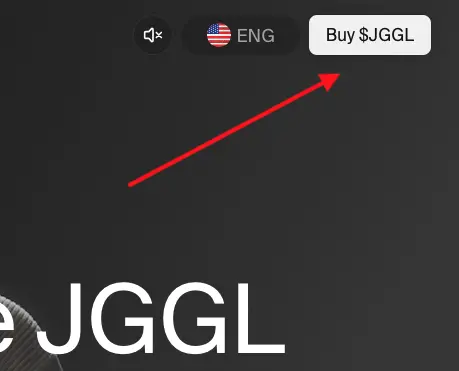
There wasn’t a lot of direction given. I was stumped. Finally, I just clicked on the JGGL side of the page, then on the “Buy $JGGL” button at the top right, and then I was able to register with my Google login. It showed I received the tokens.
And then in my account:
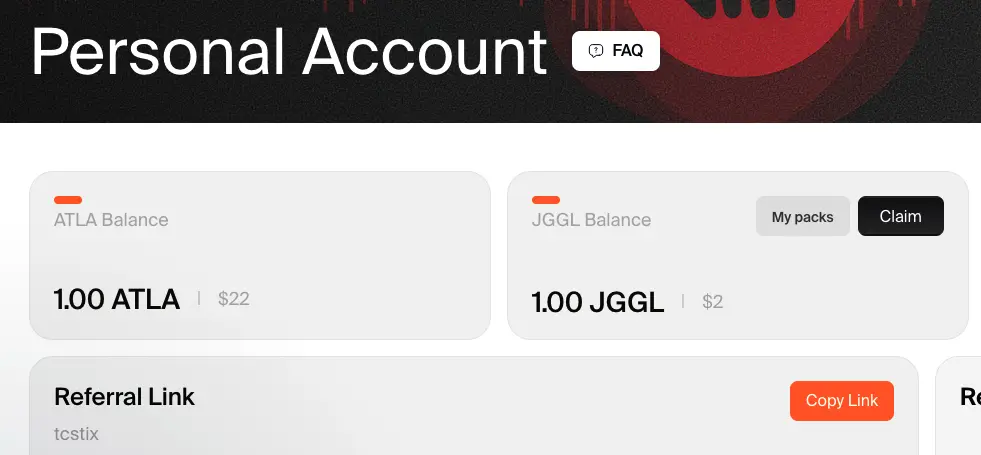
I had to connect my wallet, so I went to Other and chose Base (Coinbase) since I had that set up.
When I click “Claim” (seen next JGGL Balance in the screen shot above), it takes me here:
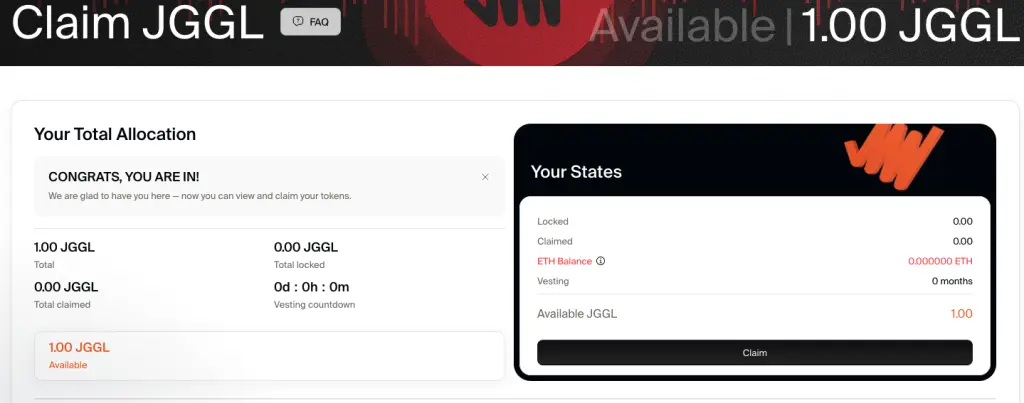
When I try to claim it, I get this message:
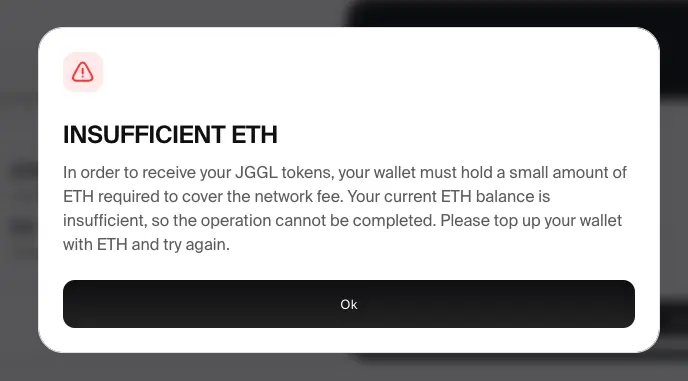
And I get it, but it doesn’t tell you how much you need. I have $1.30 in ETH in my account (0.000697), so that’s not enough apparently. Ethereum gas fees are pretty high (which is my XLM is so great).
Gemini citing MetaMask says this:
“To cover network fees for swapping to or interacting with a token like JGGL on Ethereum, you generally need roughly 0.002 to 0.005 ETH ($5–$15 USD) for simple, fast transactions, though this can spike to 0.01+ ETH during high congestion. Swapping on decentralized exchanges (e.g., Uniswap) requires more gas than sending ETH, usually requiring 45,000+ gas units per step.”
So, to get this 1 JGGL token, I need to pay $5 to $15. OK, I just purchased $20 in ETH (a $20.50 charge to my bank). That brings my ETH balance up to $19.82. It took some fiddling around because it didn’t work with the new Base wallet.
I still got the Insufficient ETH notice again. I’ll try later.
Quantum-Proof Assets… Stellar?
There’s talk about Q-Day and assets that are quantum proof. That’s important. My money (literally) is in Stellar Lumens (XLM). I’ve heard from the best source to go all in on XLM, and way before I heard that, I did. I know quantum has been a big deal with Stellar. I don’t know everything about that, but I asked Gemini if Stellar was quantum proof and here is what I got back:
Stellar (XLM) is not currently quantum-proof, but the Stellar Development Foundation (SDF) has introduced the Quantum Preparedness Plan (QPP) to transition the network to quantum-safe cryptography by the end of 2027.
The transition is outlined in the following stages:
- 2026: Post-quantum signature support will become available for enterprise wallets via Soroban contract accounts.
- 2027: A protocol upgrade will allow all classic accounts to natively add quantum-safe signers without needing to change wallet addresses.
Deprecation Phase: The network will phase out older signature systems (like Ed25519) as quantum computing threats become an immediate practical risk.Because Stellar’s account identities are separate from the signing keys used for transactions, this migration is expected to protect network security and user funds without disrupting existing balances or account history.
So it looks like they have a plan. This doesn’t completely make sense to me like I’m an expert, but I’ve heard about Soroban and other things, so this seems right.
My point with this is that it’s not like there’s just one asset out there that’s ready. Maybe some crypto is already quantum proof, but Stellar is ready for it. It’s not like they haven’t been thinking about it.
Stellar has probably about the lowest transaction fees. Their ledger is distributed, which makes it very fast. There are some good advantages to Stellar.
Again, this is not financial advice. Anything can happen. Invest at your own risk.
📄 Download a PDF of This Article