
Square Online SEO Problems

TL;DR Summary: A Square Online website can look completely normal to visitors while returning very little meaningful content in its initial HTML. In other words, search engines might not be able to really see it. Let's discuss these issues here.
When a Website Looks Fine, but Search Crawlers See Almost Nothing
Key Takeaways:
- A website that works in a browser is not necessarily easy for search engines and other crawlers to understand.
- Square Online sites may rely heavily on Vue.js and client-side rendering to construct visible page content.
- Google can execute JavaScript, so an empty initial HTML response does not automatically mean the site cannot rank.
- Important content is more reliable when headings, text, links, and metadata are included in the HTML sent by the server.
- A website audit score is a diagnostic measurement—not a Google ranking score.
- Fixing page titles, canonical URLs, social metadata, internal links, and technical configuration can still produce meaningful improvements.
Table of Contents
- Why the Site Received a Zero
- The Main Problem: Client-Side Rendering
- Can Google Read JavaScript?
- How the Problem Affects SEO
- Problems Unrelated to Vue.js
- What Square Online Site Owners Can Do
- Should You Leave Square Online?
- Final Thoughts
You Might Not Want to Build Your Website with Square Online
A website can look great in Chrome, work properly on a phone, and still have serious technical SEO weaknesses hiding underneath it.
I recently reviewed the results of a website audit for a site created with Square Online, the e-commerce platform connected to Weebly. The site used Vue.js (programming language behind it) to assemble much of its content in the visitor’s browser.
The audit gave the website a score of zero.
That sounds dramatic, but the interesting part was not the number. It was what the scanner received when it requested the website—and how different that response was from the page a human visitor saw.
Note: I’ve since adjusted my SiteAnalyzerFree.com site to not give scores of zero after seeing this. It now gets a score of 64 on a more fair / true to life grading scale. This poor score showed me a few things about the scoring, which was good, but it also showed how websites built on the wrong platform can really do poorly.

Case Study: Why the Site Received Such a Low Score
The audit began with 100 points and deducted points for each detected problem. It reported 37 findings:
- 1 critical issue
- 4 high-priority issues
- 11 medium-priority issues
- 21 low-priority issues
Together, the deductions totaled 123 points. Because the tool did not allow a negative result, the final score stopped at zero.
This was not a crash or mathematical error. The scoring system worked as designed. Of course, now it’s different, as mentioned.
However, this distinction is important: a zero from an auditing tool is not a score assigned by Google. It does not prove that Google has removed the website from its index, and it does not mean the site receives absolutely no search traffic.
An audit score is a collection of warning signals. You need to investigate the underlying causes before deciding how severe each warning really is.
The Main Problem: Client-Side Rendering
The biggest issue was the difference between the website’s initial source code and the completed page shown in a browser.
When the server received a request, it returned a relatively empty HTML shell. Much of the actual page content was stored in JavaScript data and added to the page by Vue.js after the browser loaded and ran the scripts.
This is known as client-side rendering. The “client” here in the “client-server” relationship is the web browser (your web browser application on your computer or device, like Chrome, Firefox, or Safari) – for all you non-techies out there.
What a visitor sees
A normal visitor opens the page in a modern browser. The browser downloads the HTML, JavaScript, styles, images, and other files. Vue.js then constructs the finished page.
The visitor sees headings, navigation, business information, images, product information, and links. From that person’s perspective, everything may appear to be working.
What a basic crawler sees
A crawler that reads only the initial server response may see almost none of that content. It may find an HTML framework, script references, and a large block of data—but no conventional page copy, headings, or links.
That explains why the audit reported problems such as:
- No readable page content
- No useful H2 or H3 headings
- No conventional internal links
- No visible About or Contact page links
- No readable phone number or email address
- No accessible Privacy Policy or Terms links
- Weak content depth
- Missing structured information
Some of those items may have been visible after Vue.js finished rendering the page. They simply were not present in the original HTML response the scanner evaluated.
Try it yourself
If you want to see this difference for yourself, try the free What Spiders See tool.
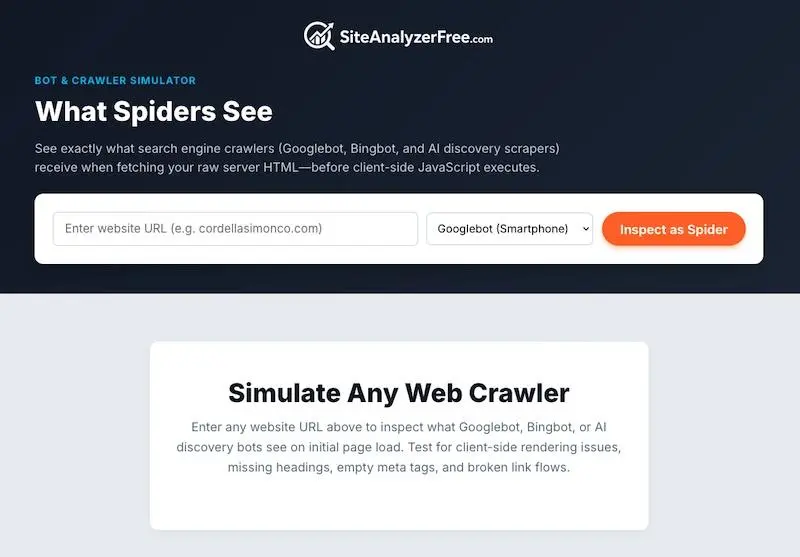
Enter any website address and choose a crawler—including Googlebot, Bingbot, GPTBot, or ClaudeBot—to inspect the raw HTML its server delivers before client-side JavaScript runs. The results can reveal missing headings, empty metadata, broken link paths, and important content that appears in a browser but is absent from the initial response.
Can Google Read JavaScript?
Yes. Google can render JavaScript, and this is where explanations of JavaScript SEO often become too simplistic.
A page is not automatically invisible to Google just because it uses Vue.js, React, Angular, or another JavaScript framework. Google uses a modern rendering system capable of executing JavaScript and examining the completed page.
Google’s own documentation, however, specifically discusses the app shell model in which the original HTML does not contain the main content. Google also warns that content may not be available when required scripts are blocked or fail to run. You can read its explanation in Google’s JavaScript SEO documentation.
The practical question is not simply, “Can Google run JavaScript?”
The better question is, “Why make a crawler perform extra work to discover the most important parts of the page?”
Google is not the only crawler
Businesses also depend on social networks, SEO tools, accessibility systems, AI crawlers, link-preview services, and other automated agents. They do not all process JavaScript with Google’s capabilities.
A site that depends entirely on client-side rendering may therefore appear complete to Google under ideal conditions while remaining incomplete or unreadable to other services.
Rendering creates more failure points
A JavaScript-rendered page depends on several things going right:
- The crawler must download the required scripts.
- The scripts must not be blocked by robots.txt or security rules.
- The JavaScript must execute without errors.
- External resources and APIs must respond.
- The important content must appear within the crawler’s rendering process.
- Client-side routing must expose distinct, crawlable URLs.
Server-rendered or statically generated HTML gives crawlers the core content immediately. JavaScript can then enhance the page without being responsible for its entire meaning.
How This Negatively Affects SEO
Client-side rendering does not create one isolated SEO problem. It can affect several signals at once. Because of that, your website has a huge disadvantage when it comes to ranking in search results.
Headings and page topics
Headings help visitors scan a page and help search systems understand its organization. If headings exist only after JavaScript runs, a non-rendering crawler cannot use them.
Internal links
Ordinary HTML links help crawlers discover pages and understand how the site is organized. If the initial source contains no normal <a href="..."> links, page discovery becomes more dependent on rendering, sitemaps, and other signals.
Business information
A visible phone number is more useful when it is also a proper tel: link. The same applies to an email address and a mailto: link. Keeping essential contact information inside JavaScript data makes it harder for basic crawlers and assistive tools to identify.
Structured data
Structured data can help search engines identify an organization, local business, product, article, event, or frequently asked question. Although JSON-LD may be added with JavaScript, including valid, stable markup in the delivered page source generally reduces uncertainty.
AI visibility
Search engines are no longer the only systems trying to interpret websites. AI agents and answer engines may retrieve pages with different rendering capabilities and resource limits.
Clear HTML does not guarantee an AI citation. It does, however, make the information easier for a broader range of systems to retrieve and understand.
Problems Unrelated to Vue.js
The rendering method was not the only concern found in the audit. Several problems were independent of Vue.js and could affect almost any website.
A generic home page title
The title followed a basic “Home | Company Name” pattern. That wastes one of the strongest opportunities to explain what the company does and where or whom it serves.
A better title would normally combine the main service, an important differentiator or location when appropriate, and the company name.
Missing canonical information
A canonical tag identifies the preferred URL for a page. Without one, search engines may have to decide between URL variations on their own.
The audit also found that HTTP and HTTPS versions were not being consolidated as expected. A site should normally redirect visitors and crawlers to one secure, preferred version of each URL.
Missing social sharing image
An Open Graph image does not directly determine normal organic rankings, but it affects how a page appears when someone shares it on social media, messaging apps, and other platforms. A missing image can make a legitimate page look unfinished.
Email authentication problems
The domain reportedly lacked SPF and DMARC records. These DNS records are email-security controls rather than conventional on-page ranking factors, but they help protect the domain from impersonation and improve the reliability of legitimate email.
Missing security headers
The audit also reported missing security headers related to content restrictions, framing, referrer information, and content-type handling.
Security headers are not a substitute for SEO, and not every missing header causes a ranking loss. They are still part of maintaining a professionally configured website.
What Square Online Site Owners Can Do
Square provides settings for page titles, descriptions, URL slugs, redirects, and search visibility. Its current instructions are available in the Square Online SEO guide.
Start with the improvements the platform allows you to control.
1. Rewrite every important page title
Do not leave a home page titled only “Home.” Give every major page a unique title that clearly describes its purpose.
2. Write useful meta descriptions
A meta description is not a guaranteed ranking boost, but a clear description can improve the search result and encourage the right person to click.
3. Strengthen the visible page copy
Explain what the business offers, who it helps, where it operates, and why a customer should choose it. A few attractive images and short slogans are rarely enough for competitive searches.
4. Create descriptive internal links
Link related services, products, categories, FAQs, and contact information together. Use descriptive link text instead of repeating “click here.”
5. Check the rendered page in Google Search Console
Use URL Inspection to see whether Google can access and render a representative page. Compare the rendered result with what a visitor sees.
Also search for a distinctive sentence from the page in quotation marks. This is not a perfect indexing test, but it can help reveal whether Google has discovered that specific copy.
6. Test more than the home page
Check product pages, service pages, category pages, About, Contact, privacy information, and other important URLs. A successfully rendered home page does not prove that every client-side route works correctly.
7. Fix domain and DNS configuration
Confirm that all traffic redirects to one HTTPS version of the domain. Add appropriate SPF, DKIM, and DMARC records for the company’s email provider. Review missing security headers with the platform or a qualified developer.
8. Run another audit
After making changes, scan the website again. The purpose of an audit is not to admire or fear the score. It is to identify a problem, correct it, and verify the result.
Should You Leave Square Online?
Not necessarily.
A platform decision should consider sales features, inventory, payment processing, ease of use, maintenance, conversion performance, and the business’s dependence on organic search.
A small store that primarily gets customers from direct referrals or social media may value Square’s simplicity more than advanced technical control. A business that depends heavily on competitive search rankings may eventually need a platform offering better control over rendering, metadata, structured data, redirects, and server configuration.
Before rebuilding anything, collect evidence:
- Review indexed pages in Google Search Console.
- Check whether important content appears in Google’s rendered version.
- Examine organic impressions, clicks, and queries.
- Confirm whether the site ranks for its company name and main services.
- Separate platform limitations from fixable content and configuration problems.
- Create a migration and redirect plan before changing platforms.
A rushed migration can cause more SEO damage than the original website problem, especially if URLs change without proper 301 redirects.
Final Thoughts
The most useful lesson from this audit is that not all Square Online or Weebly websites are bad for SEO. That conclusion would be too broad.
The lesson is that a website’s appearance does not tell you what its server sends to a crawler.
Google can process JavaScript, but a site is more dependable when its essential content, headings, links, and metadata do not depend entirely on client-side execution. Clear initial HTML also makes the website easier for other search tools, social services, accessibility systems, and AI crawlers to understand.
Treat a bad audit score as a reason to investigate, not a reason to panic. Look at what was actually detected, separate rendering limitations from genuine configuration problems, fix the issues you can control, and test again.
If the platform continues to hide important content or prevents essential technical changes, then it may be time to consider a website system that gives you more control.
📄 Download a PDF of This Article