How to Force Index Your Website With Google – Force a Google Crawl
 Reading Time: 4 minutes
 TL;DR Summary: The post discusses how to force google to crawl your website with the use of a free tool - along with a couple secret weapons to help. Doing this can potentially achieve instant rankings for new content. The post explains how to use Google Search Console to request a crawl of a specific URL and notes that results may vary. It also provides instructions on setting up Google Search Console and monitoring the indexing process.
Use a Free, Special Tool to Get Possible Instant Rankings
When you publish new content, it sometimes helps to give Google a little nudge so they can stop by your website and crawl your new post. Depending on the content and some other factors, you might see your page indexed (shown on Google) within a few hours if you do a force index. This page will explain how to do that.
Pages have been know to get instant rankings by using this tool but results may vary. It’s worth doing for sure.
Google says, “If you’ve recently added or made changes to a page on your site, you can request that Google re-index your page using any of the methods listed here.”
Doing this action forces Google to crawl your website. This is what this tool is for. The tool is most effective if you’ve recently published new content on your website.
First a website is crawled, and then (later) it’s put into the index (into search results). But a lot of people ask me how to get Google to index their site, which is the next step, so read on…

What is a Force Index?
A force index is when you use Google Search Console to ask Google to crawl a certain URL on your website. It can be the home page or a certain page, like content you just published.
If you haven’t set up Search Console yet, here’s some help:
To Force Index Your Website:
- Login to Google Search Console (if you don’t have it set up yet, you’ll need to do that)
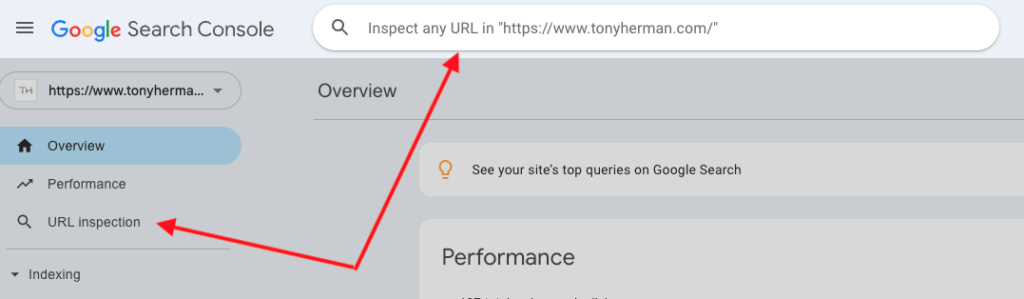
- Click on “URL Inspection” on the left side or just paste in the full URL at the top.
- After that, click the “TEST LIVE URL” button to have that page crawled.
Google also says, “Requesting a crawl does not guarantee that inclusion will happen instantly or even at all. Our systems prioritize the fast inclusion of high quality, useful content.”
Then, just wait. It’ll take a few days or even up to a week. Search for your domain name on Google like this:
site:[your domain name]
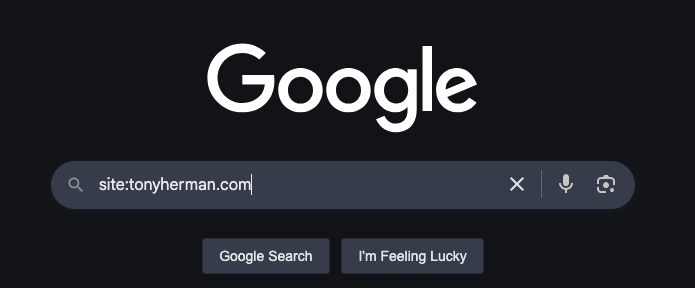
If it works, you should see results, which are pages from just your website listed, like this:

My Secret Weapons
And then I have a secret weapon I use to both get a bunch of good, safe, base-level backlinks and get Google to notice a page. Here they are:
Use this tool with any URL to use different Google links to grab a certain page – basically forcing Google to crawl the page and maybe your entire website. Just enter the URL:
Use this tool with a domain name to get nearly 150 good, safe backlinks. Think of it as a base of backlinks, showing that the website is out there. I think these are safe links to get with any website – even if it’s brand new:
My Thoughts on Trying to Get Google to Index Your Site
Write good content – that’s always the key. It always works. That’s more than AI-generated content. You need to include original research. Do what AI can’t do. That kind of content will be unique. Use AI to polish it up.
Next, give the answer right away in your articles and posts. I use a little TL;DR summary plugin I created to do this on my posts. And then put it at the very beginning of the content. Get to the point, no fluff. People will read it, be happy they found what they need, and they’ll stick around to read more.
Bottom line: If you need to force Google to index your site, maybe your site isn’t index-worthy. Think about it. The best SEO is long-term, white hat SEO.
📄 Download a PDF of This Article